Brainfart moment this morning when my password safe prompted me to unlock it with a password, and for a moment I thought to myself “Why am I having to manually type in a password? Don’t I have a password safe to do this for me?” 🤦
Dan Q
Brainfart moment this morning when my password safe prompted me to unlock it with a password, and for a moment I thought to myself “Why am I having to manually type in a password? Don’t I have a password safe to do this for me?” 🤦
This is a video version of my blog post, Length Extension Attack. In it, I talk through the theory of length extension attacks and demonstrate an SHA-1 length extension attack against an (imaginary) website.
The video can also be found on:
Prefer to watch/listen than read? There’s a vloggy/video version of this post in which I explain all the key concepts and demonstrate an SHA-1 length extension attack against an imaginary site.
I understood the concept of a length traversal attack and when/how I needed to mitigate them for a long time before I truly understood why they worked. It took until work provided me an opportunity to play with one in practice (plus reading Ron Bowes’ excellent article on the subject) before I really grokked it.
Would you like to learn? I’ve put together a practical demo that you can try for yourself!
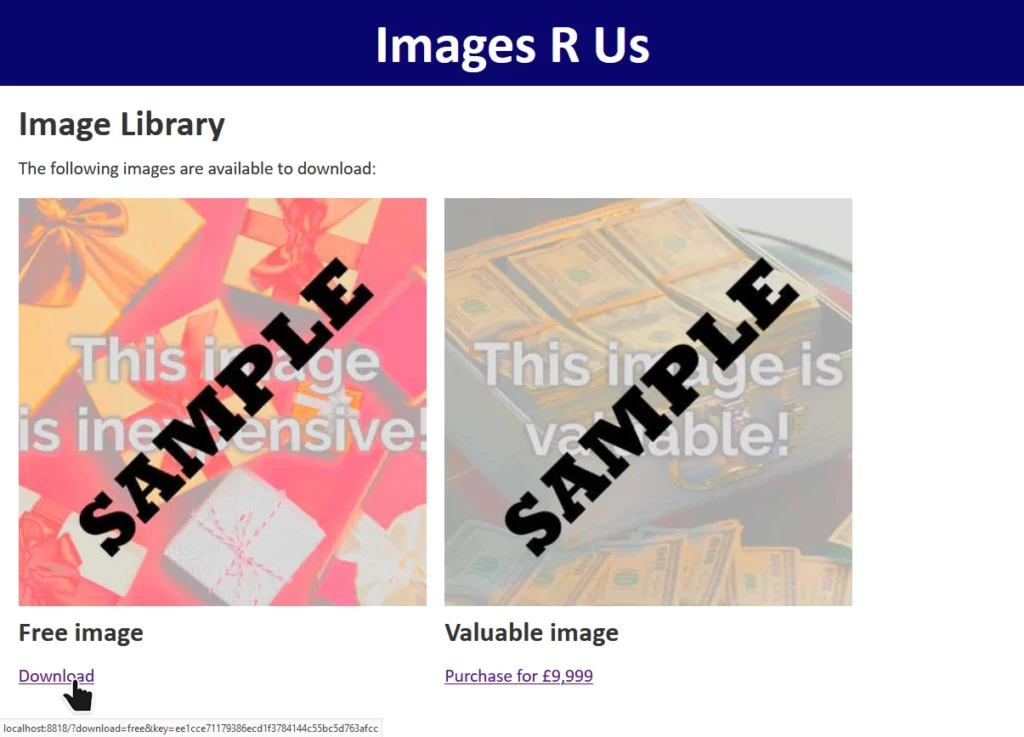
You can check out the code and run it using the instructions in the repository if you’d like to play along.
The site “Images R Us” will let you download images you’ve purchased, but not ones you haven’t. Links to the images are protected by a SHA-1 hash1, generated as follows:

When a “download” link is generated for a legitimate user, the algorithm produces a hash which is appended to the link. When the download link is clicked, the same process is followed and the calculated hash compared to the provided hash. If they differ, the input must have been tampered with and the request is rejected.
Without knowing the secret key – stored only on the server – it’s not possible for an attacker to generate a valid hash for URL parameters of the attacker’s choice. Or is it?
download=free to download=valuable invalidates the hash, and the request is denied.
Actually, it is possible for an attacker to manipulate the parameters. To understand how, you must first understand a little about how SHA-1 and its siblings actually work:
SECRET_KEY + URL_PARAMS) is cut into blocks of a fixed size.2

In SHA-1, blocks are 512 bits long and the padding is a 1, followed by as many 0s as is necessary,
leaving 64 bits at the end in which to specify how many bits of the block were actually data.
Looking at the final block in a given message, it’s apparent that there are two pieces of data that could produce exactly the same output for a given function:

Therefore, if we can manipulate the input of the message, and we know the length of the message, we can append to it. Bear that in mind as we move on to the other half of what makes this attack possible.
“Images R Us” is implemented in PHP. In common with most server-side scripting languages, when PHP sees a HTTP query string full of key/value pairs, if a key is repeated then it overrides any earlier iterations of the same key.

$_SERVER['QUERY_STRING'] in PHP, where you’ll find the entire query string.
You could even implement your own query string handler that instead makes the first instance of each key the canonical one, if you really wanted.6
download=free parameter in the query string at “Images R Us”, e.g. making it
download=free&download=valuable! But we can’t: not without breaking the hash, which is calculated based on the entire query string (minus the &key=...
bit).
But with our new knowledge about appending to the input for SHA-1 first a padding string, then an extra block containing our payload (the variable we want to override and its new value), and then calculating a hash for this new block using the known output of the old final block as the IV… we’ve got everything we need to put the attack together.
We have a legitimate link with the query string download=free&key=ee1cce71179386ecd1f3784144c55bc5d763afcc. This tells us that somewhere on the server, this is
what’s happening:

download=free with some special characters to replicate the padding that would otherwise be added to this final8 block, we can add a second block containing
an overriding value of download, specifically &download=valuable. The first value of download=, which will be the word free followed by
a stack of garbage padding characters, will be discarded.
And we can calculate the hash for this new block, and therefore the entire string, by using the known output from the previous block, like this:

Of course, you’re not going to want to do all this by hand! But an understanding of why it works is important to being able to execute it properly. In the wild, exploitable implementations are rarely as tidy as this, and a solid comprehension of exactly what’s happening behind the scenes is far more-valuable than simply knowing which tool to run and what options to pass.
That said: you’ll want to find a tool you can run and know what options to pass to it! There are plenty of choices, but I’ve bundled one called hash_extender into my example, which will do the job pretty nicely:
$ docker exec hash_extender hash_extender \
    --format=sha1 \
    --data="download=free" \
    --secret=16 \
    --signature=ee1cce71179386ecd1f3784144c55bc5d763afcc \
    --append="&download=valuable" \
    --out-data-format=html
Type: sha1
Secret length: 16
New signature: 7b315dfdbebc98ebe696a5f62430070a1651631b
New string: download%3dfree%80%00%00%00%00%00%00%00%00%00%00%00%00%00%00%00%00%00%00%00%00%00%00%00%00%00%00%00%00%00%00%00%00%00%e8%26download%3dvaluable
I’m telling hash_extender:
sha1), which can usually be derived from the hash length,
download=free), so it can determine the length,
16 bytes), which I’ve guessed but could brute-force,
ee1cce71179386ecd1f3784144c55bc5d763afcc),
&download=valuable), and
html the most-useful generally, but it’s got some encoding quirks that you need to be aware of!
hash_extender outputs the new signature, which we can put into the key=... parameter, and the new string that replaces download=free, including
the necessary padding to push into the next block and your new payload that follows.
Unfortunately it does over-encode a little: it’s encoded all the& and = (as %26 and %3d respectively), which isn’t what we
wanted, so you need to convert them back. But eventually you end up with the URL:
http://localhost:8818/?download=free%80%00%00%00%00%00%00%00%00%00%00%00%00%00%00%00%00%00%00%00%00%00%00%00%00%00%00%00%00%00%00%00%00%00%e8&download=valuable&key=7b315dfdbebc98ebe696a5f62430070a1651631b.
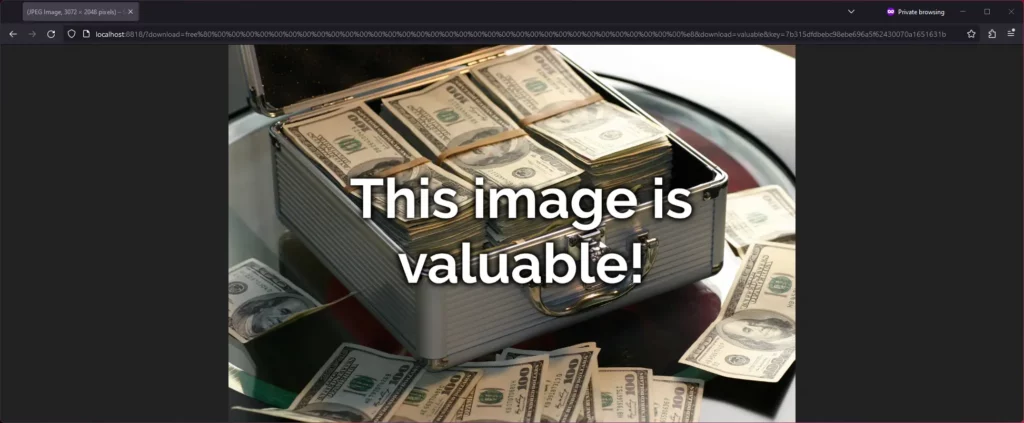
And that’s how you can manipulate a hash-protected string without access to its salt (in some circumstances).
The correct way to fix the problem is by using a HMAC in place
of a simple hash signature. Instead of calling sha1( SECRET_KEY . urldecode( $params ) ), the code should call hash_hmac( 'sha1', urldecode( $params ), SECRET_KEY
). HMACs are theoretically-immune to length extension attacks, so long as the output of the hash function used is
functionally-random9.
Ideally, it should also use hash_equals( $validDownloadKey, $_GET['key'] ) rather than ===, to mitigate the possibility of a timing attack. But that’s another story.
1 This attack isn’t SHA1-specific: it works just as well on many other popular hashing algorithms too.
2 SHA-1‘s blocks are 64 bytes long; other algorithms vary.
3 For SHA-1, the padding bits
consist of a 1 followed by 0s, except the final 8-bytes are a big-endian number representing the length of the message.
4 SHA-1‘s IV is 67452301 EFCDAB89 98BADCFE 10325476 C3D2E1F0, which you’ll observe is little-endian counting from 0 to
F, then back from F to 0, then alternating between counting from 3 to 0 and C to F. It’s
considered good practice when developing a new cryptographic system to ensure that the hard-coded cryptographic primitives are simple, logical, independently-discoverable numbers like
simple sequences and well-known mathematical constants. This helps to prove that the inventor isn’t “hiding” something in there, e.g. a mathematical weakness that depends on a
specific primitive for which they alone (they hope!) have pre-calculated an exploit. If that sounds paranoid, it’s worth knowing that there’s plenty of evidence that various spy
agencies have deliberately done this, at various points: consider the widespread exposure of the BULLRUN programme and its likely influence on Dual EC DRBG.
5 The padding characters I’ve used aren’t accurate, just representative. But there’s the right number of them!
6 You shouldn’t do this: you’ll cause yourself many headaches in the long run. But you could.
7 It’s also not always obvious which inputs are included in hash generation and how they’re manipulated: if you’re actually using this technique adversarily, be prepared to do a little experimentation.
8 In this example, the hash operates over a single block, but the exact same principle applies regardless of the number of blocks.
9 Imagining the implementation of a nontrivial hashing algorithm, the predictability of whose output makes their HMAC vulnerable to a length extension attack, is left as an exercise for the reader.
The first “full” day of WordCamp Europe 2023 (which kicked-off at Contributor Day) was busy and intense, but I loved it.
This post is basically a live-blog of everything I got up to, and it’s mostly for my own benefit/notetaking. If you don’t read it, nobody will blame you.
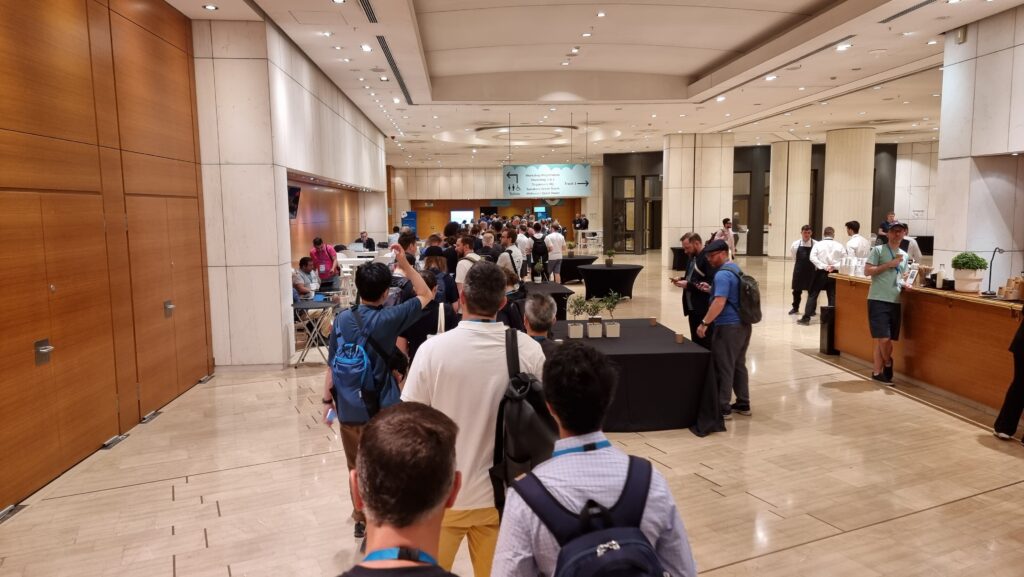
Here’s what I got up to:
David Artiss took the courageous step of installing 36 popular plugins onto a fresh WordPress site and was, unsurprisingly, immediately bombarded by a billion banners on his dashboard. Some were merely unhelpful (“don’t forget to add your API key”), others were annoying (“thanks for installing our plugin”), and plenty more were commercial advertisements (“get the premium version”) despite the fact that WordPress.org guidelines recommend against this. It’s no surprise that this kind of “aggressive promotion” is the single biggest annoyance that people reported when David asked around on social media.
Similarly, plugins which attempt to break the standard WordPress look-and-feel by e.g. hoisting themselves to the top of the menu, showing admin popovers, putting settings sections in places other than the settings submenu, and so on are a huge annoyance to everybody. I get sufficiently frustrated by these common antifeatures of plugins I use that I actually maintain a plugin for my own use that “fixes” the ones that aggrivate me the most!
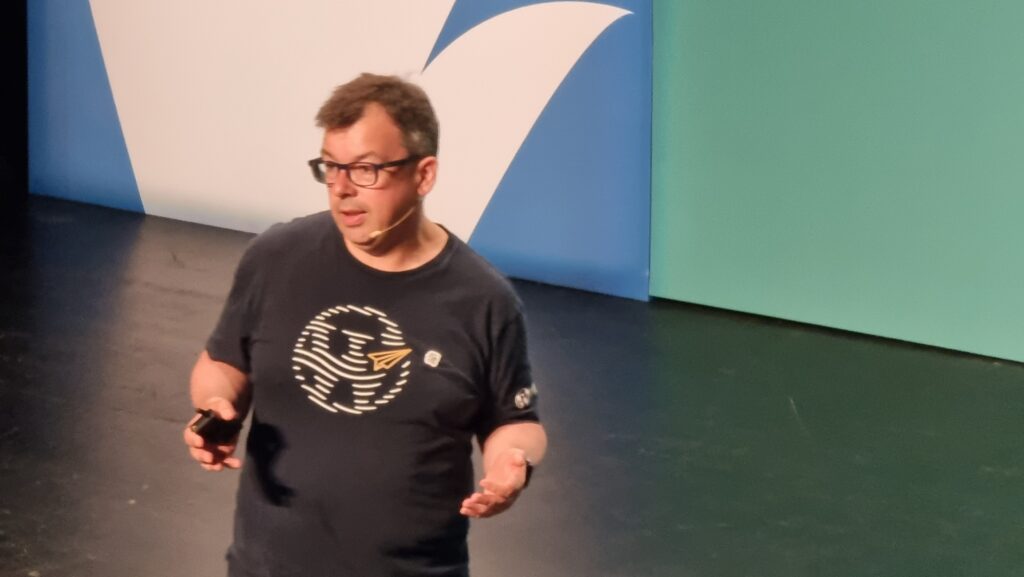
David’s promised to put his slides online, plus to write articles about everything that came up in his Q&A.
I’m unconvinced that we can rely on plugin developers to independently fix the kinds of problems that come high on David’s list. I wonder if there’s mileage in WordPress Core reimplementing the way that the main navigation menu works such that all items in it can be (easily) re-arranged by users to their own preference? This would undermine the perceived value to plugin developers of “hoisting” their own to the top by allowing users to counteract it, and would provide a valuable feature to allow site admins to streamline their workflow: use WooCommerce but only in a way that’s secondary to your blog? Move “Products” below “Posts”! Etc.
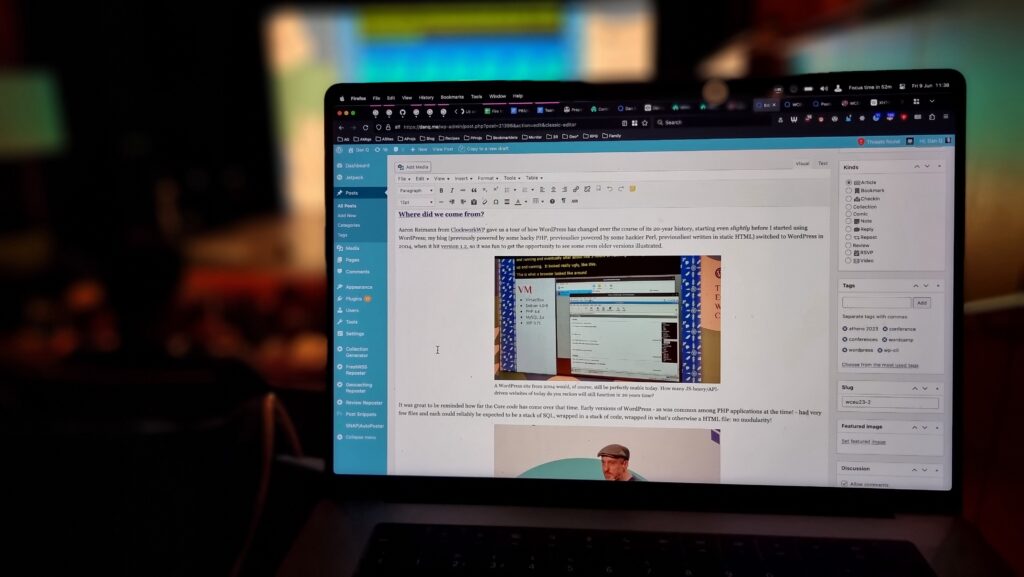
Aaron Reimann from ClockworkWP gave us a tour of how WordPress has changed over the course of its 20-year history, starting even slightly before I started using WordPress; my blog (previously powered by some hacky PHP, previouslier powered by some hackier Perl, previousliest written in static HTML) switched to WordPress in 2004, when it hit version 1.2, so it was fun to get the opportunity to see some even older versions illustrated.
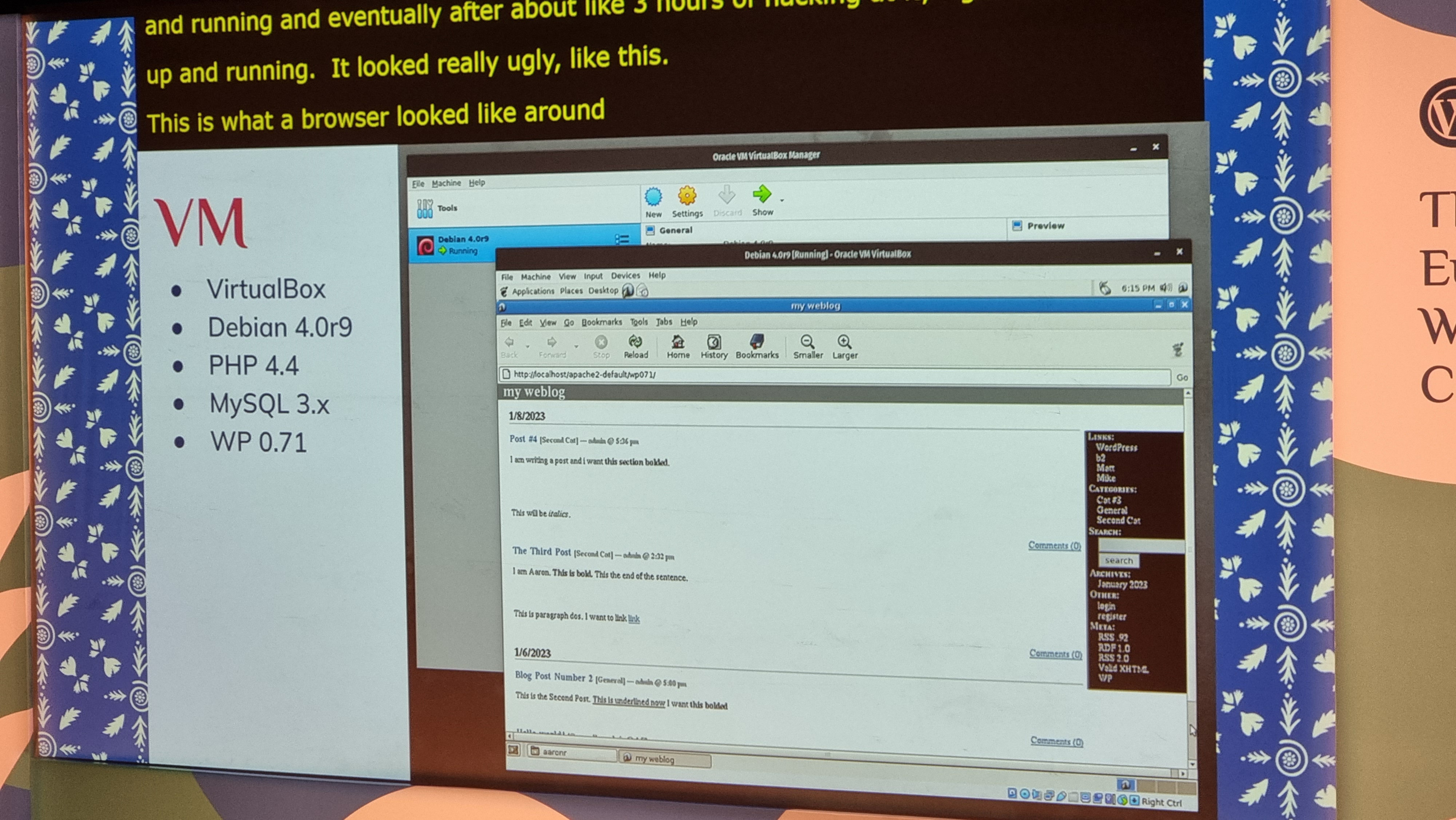
It was great to be reminded how far the Core code has come over that time. Early versions of WordPress – as was common among PHP applications at the time! – had very few files and each could reliably be expected to be a stack of SQL, wrapped in a stack of code, wrapped in what’s otherwise a HTML file: no modularity!

There were very few surprises for me in this talk, as you might expect for such an “old hand”, but I really enjoyed the nostalgia of exploring WordPress history through his eyes.
I enjoyed putting him on the spot with a “spicy” question at the end of his talk, by asking him if, alongside everything we’ve gained over the years, whether there’s anything we lost along the way. He answered well, pointing out that the somewhat bloated stack of plugins that are commonplace on big sites nowadays and the ease with which admins can just “click and install” more of them. I agree with him, although personally I miss built-in XFN support…
There’s a lot of exhibitors with stands, but I tried to do a circuit or so and pay attention at least to those whose owners I’ve come into contact with in a professional capacity. Many developers who make extensions for WooCommerce, of course, sell those extensions through WooCommerce.com, which means they come into routine direct contact with my code (and it can mean that when their extension’s been initially rejected by our security scanners or linters, it’s me their developers first want to curse!).
It’s been great to connect with people using WordPress to power the Web in a whole variety of different contexts, but it somehow still feels strange to me that WordPress has such a commercial following! Even speaking as somebody who’s made their living at least partially out of WordPress for the last decade plus, it still feels to me like its greatest value comes from its use for personal publishing.
The feel of a WordCamp with its big shiny sponsors is enormously different from, say, the intimacy and individuality of a Homebrew Website Club meeting, and I think that’s something I still need to come to terms with. WordPress’s success story comes from many different causes, but perhaps chief among them is the fact that it’s versatile enough to power the website of a government, multinational, or household-name brand… but also to run the smallest personal indie blog. I struggle to comprehend that, even with my background.
(Side note, Sophie Koonin says that building a personal website is a radical act in 2023, and I absolutely agree.)

I was proud of my colleagues for the “gimmick” they were using to attract people to the Woo stand: you could pick up a “credit card” and use it to make a purchase (of Greek olive oil) using a website, see your order appear on the app at the backend in real-time, and then receive your purchase as a giveaway. The “credit card” doubles as a business card from the stand, the olive oil is a real product from a real, local producer (who really uses WooCommerce to sell online!), and when you provide an email address at the checkout you can opt-in to being contacted by the team afterwards. That’s some good joined-up thinking by my buddies in marketing!
Petya Petkova observed that it’s commonplace to take the easy approach and make a website look like… well, every other website. “Web deja-vu” is a real thing, and it’s fed not only by the ebbs and flows of trends in web design but by the proliferation of indistinct themes that people just install-and-use.
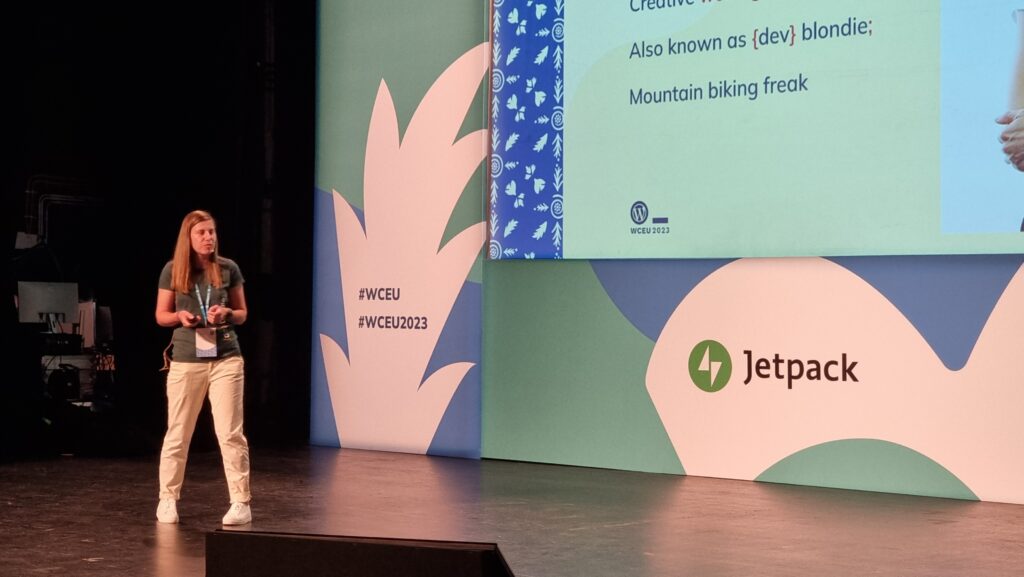
Choice of colours and typography can be used to tell a story, to instil a feeling, to encourage engagement. Scrolling can be used as a metaphor for storytelling (“scrolly-telling”, Petya calls it). Animation flow can be used to direct a user’s attention and drive focus and encourage interaction.
A lot of the technical concepts she demonstrated – parts of a page that scroll at different speeds, typography that shifts or changes, videos used in a subtle way to accentuate other content, etc. – can be implemented in the frontend with WebGL, Three.js and the like. Petya observes that moving this kind of content interactivity into the frontend can produce an illusion of a performance improvement, which is an argument I’ve heard before, but personally I think it’s only valuable if it’s built as a progressive enhancement: otherwise, you’re always at risk that your site won’t look like you’d hope.
I note, for example, that Petya’s agency’s site shows only an “endless spinner” when viewed in my browser (which blocks the code.jQuery CDN by default, unless allowlisted for specific sites). All of the content is there, on the page, if you View Source, but it’s completely invisible if an external JavaScript fails to load. That doesn’t just happen when weirdos like me disable JavaScript in their browsers: it can happen if the browser interacts badly with the script, or if the user’s Internet connection is ropey, or a malware scanner misfires, or if government censorship blocks the CDN, or in any number of other conditions.
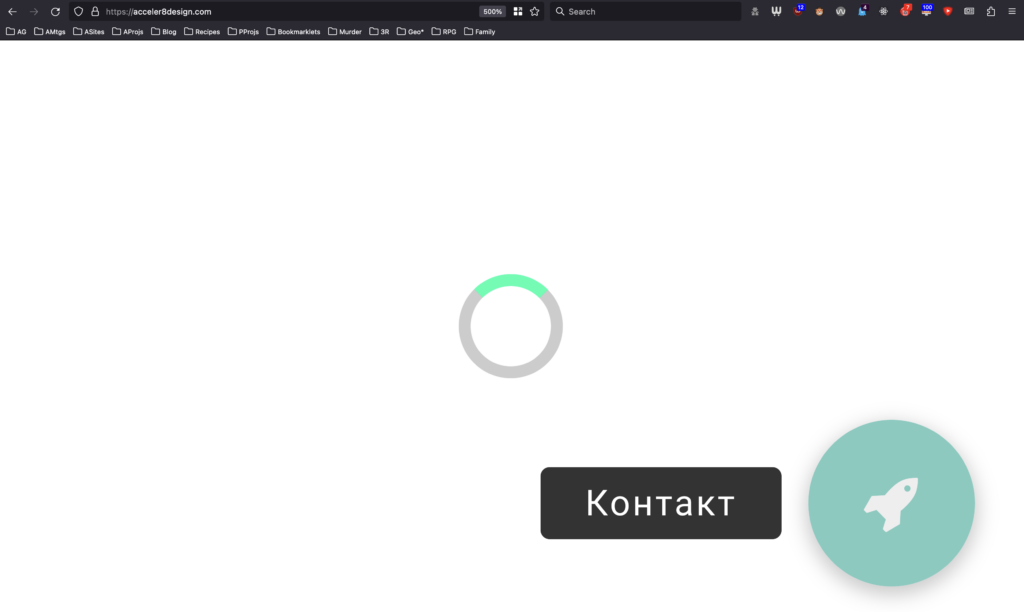
So yeah: uniqueness and creativity are great, and I like what she’s proposing, but not the way she goes about it. The first person to ask a question wisely brought up accessibility, and
Petya answered well that accessibility technologies can bridge the gap, but I’d counter that it’s preferable to build accessible in the first instance: if you have to
use an aria- attribute it’s a good sign that you probably already did something wrong (not always, but it’s certainly a pointer that you ought to take a step back
and check!).
Several other good questions and great answers followed: about how to showcase a preliminary design when they design is dependent upon animation and interactivity (which I’ve witnessed before!), on the value of server-side rendering of components, and about how to optimise for smaller screens. Petya clearly knows her stuff in all of these areas and had confident responses.
Oliver Sild is the kind of self-taught hacker, security nerd, and community builder that I love, so I wasn’t going to miss his talk.
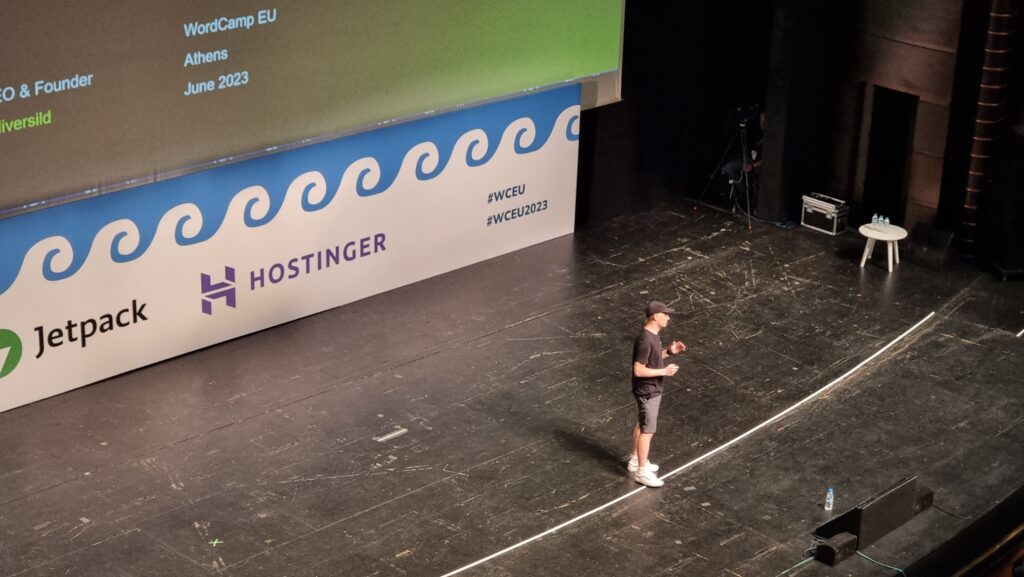
It’s good news in general in WordPress Security-land… but CSRF is on the up-and-up (overtaking XSS) in the plugin space. That, and all the broken access control we see in the admin area, are things I’ll be keeping in mind next time I’m arguing with a vendor about the importance of using nonces and security checks in their extension (I have this battle from time to time!).
But an interesting development is the growth of the supply chains in the WordPress plugin ecosystem. Nowadays a plugin might depend upon another plugin which might depend upon a library… and a patch applied to the latter of those might take time to be propagated through the chain, providing attackers with a growing window of opportunity.
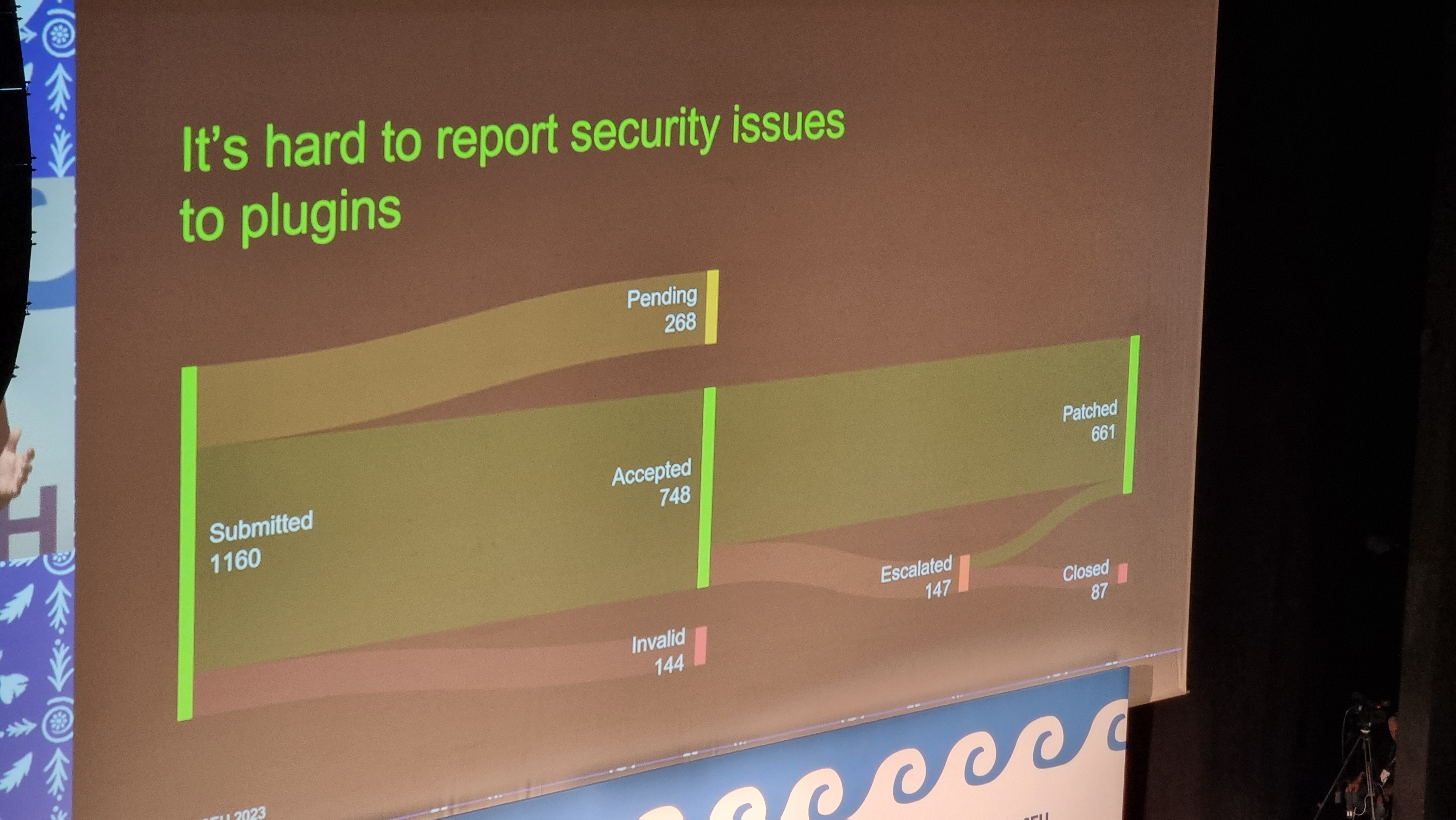
A worrying thought is that while plugin directory administrators will pull and remove plugins that have longstanding unactioned security issues. But that doesn’t help the sites that already have that plugin installed and are still using it! There’s a proposal to allow WordPress to notify admins if a plugin used on a site has been dropped for security reasons, but it was opened 9 years ago and hasn’t seen any real movement, soo…
I like that Oliver plugged for security researchers being acknowledged as equal contributors to developers on your software. But then, I would say that, as somebody who breaks into things once in a while and then tells the affected parties how to fix the problem that allowed me to do so! He also provided a whole wealth of tips for site owners and agencies to try to keep their sites safe, but little that I wasn’t aware of already.
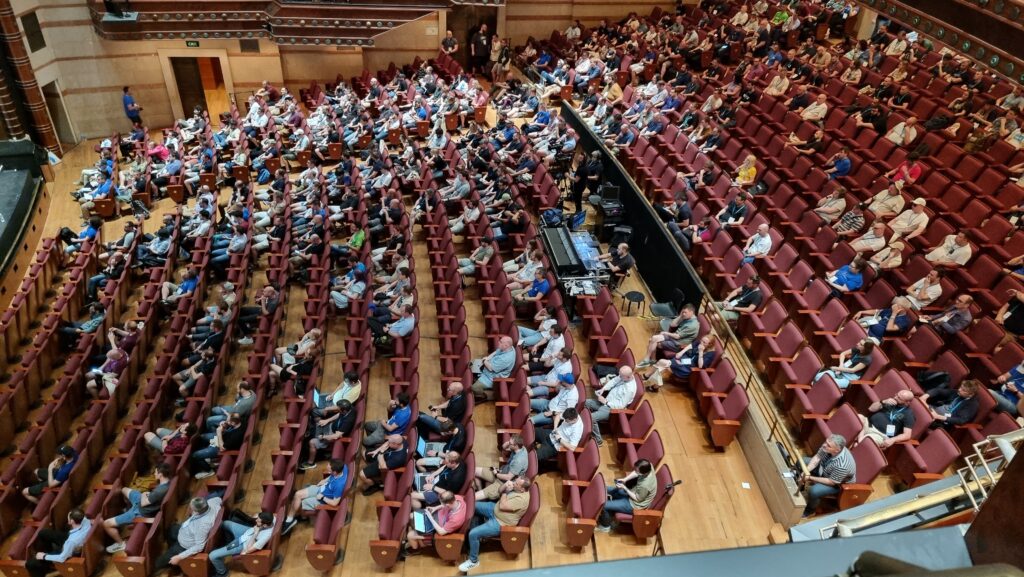
It was about this point in the day, glancing at my schedule and realising that at any given time there were up to four other sessions running simultaneously, that I really got
a feel for the scale of this conference. Awesome. Meanwhile, Oliver was fielding the question that I’m sure everybody was thinking: with Gutenberg blocks powered by JavaScript that are
often backed by a supply-chain of the usual billion-or-so files you find in your .node_modules directory, isn’t the risk of supply chain attacks increasing?
Spoiler: yes. Did you notice earlier in this post I mentioned that I don’t use Gutenberg on this site yet?

My first “workshop” was run by Giulia Laco, on the topic of readable content and design.
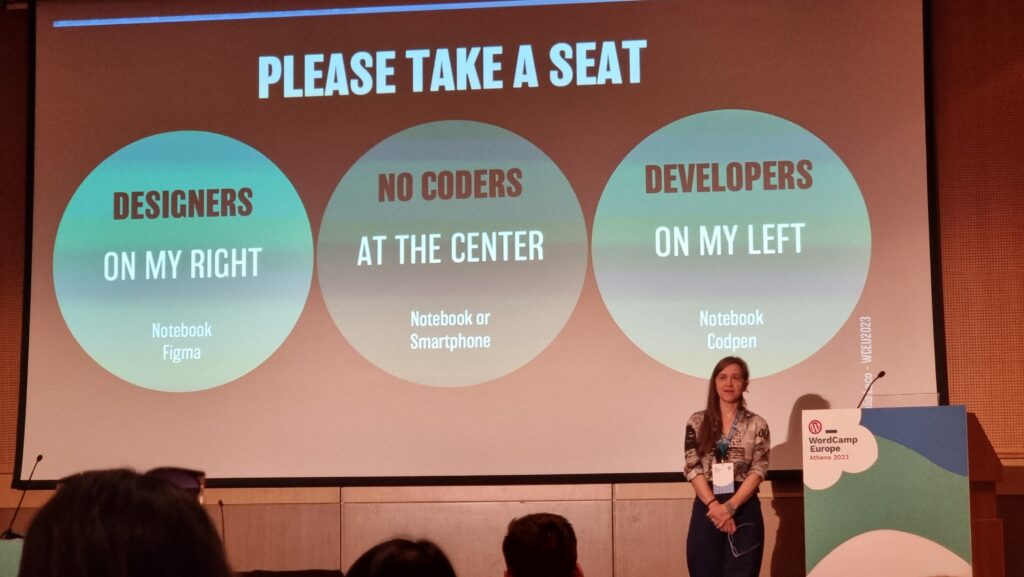
Giulia began by reminding us how short the attention span of Web readers is, and how important the right typographic choices are in ensuring that people actually read your content. I fully get this – I think that very few people will have the attention span to read this part of this very blog post, for example! – but I loved that she hammered the point home by presenting every slide of her presentation twice (or more), “improving” the typographic choices as she went along: an excellent and memorable quirk.
Our capacity to read and comprehend a text is affected by a combination of common (distance, lighting, environment, concentration, mood, etc.), personal (age, proficiency, motiviation,
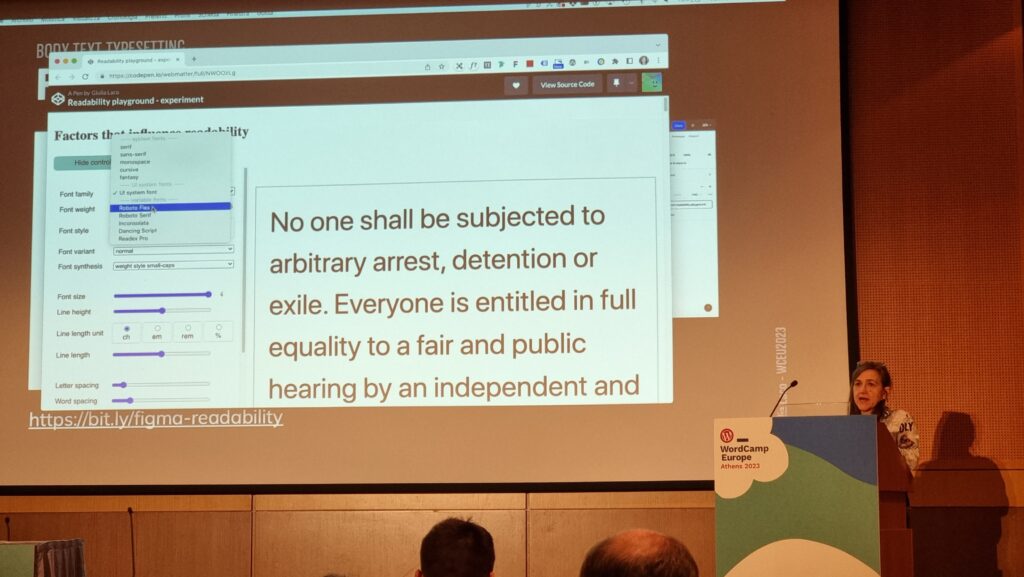
accessibility requirements, etc.), and typographic (face, style, size, line length and spacing, contrast, width, rhythm etc.) factors. To explore the impact of the typographic factors,
the group dived into a pre-prepared Codepen and a shared Figma diagram. (I immediately had a TIL moment over the font-synthesis: CSS property!)
Things get interesting at the intersection of readability and accessibility. For example, WCAG accessibility requirements demand that you don’t use images of text (we used to do this a lot back before we could reliably use fonts on the web, and before we could easily have background images on e.g. buttons for navigation). But this accessibility requirement also aids screen readability when accounting for e.g. “retina” screens with virtual pixel ratios.
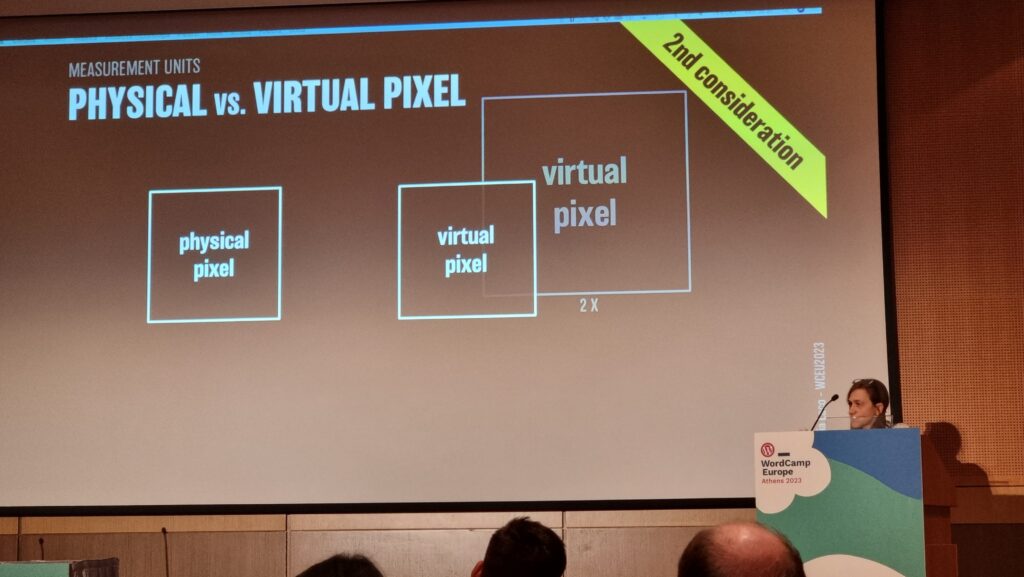
Giulia provided a great explanation of why we may well think in pixels (as developers or digital designers) but we’re unlikely to use them everywhere: I’d internalised this lesson long ago but I appreciated a well-explained justification. The short of it is: screen zoom (that fancy zoom feature you use in your browser all the time, especially on mobile) and text zoom (the one you probably don’t use, or don’t use so much) are different things, and setting a pixel-based font size in the root node wrecks the latter, forcing some people with accessibility needs to use the former, which is likely to result in vertical scrolling. Boo!
I also enjoyed seeing this demo of how the different hyphenation-points in different languages (because of syllable stress) can impact on your wrapping points/line lengths when content is translated. This can affect any website, of course, because any website can be the target of automatic translation.
Plus, Giulia’s thoughts on the value of serifed fonts (even on digital displays) for improving typographic readability of the letters d, b, p and q which are often mirror- or rotationally-symmetric to one another in sans-serif fonts. It’s amazing to have something – in this case, a psychological letter transposition – pointed out that I’ve experienced but never pinned down the reason for, before. Neat!
It was a shame that this workshop took place late in the day, because many of the participants (including me) seemed to have flagging energy levels!
Altogether a great (but intense) day. Boggles my mind that there’s another one like it tomorrow.
The two most important things you can do to protect your online accounts remain to (a) use a different password, ideally a randomly-generated one, for every service, and (b) enable two-factor authentication (2FA) where it’s available.
If you’re not already doing that, go do that. A password manager like 1Password, Bitwarden, or LastPass will help (although be aware that the latter’s had some security issues lately, as I’ve mentioned).
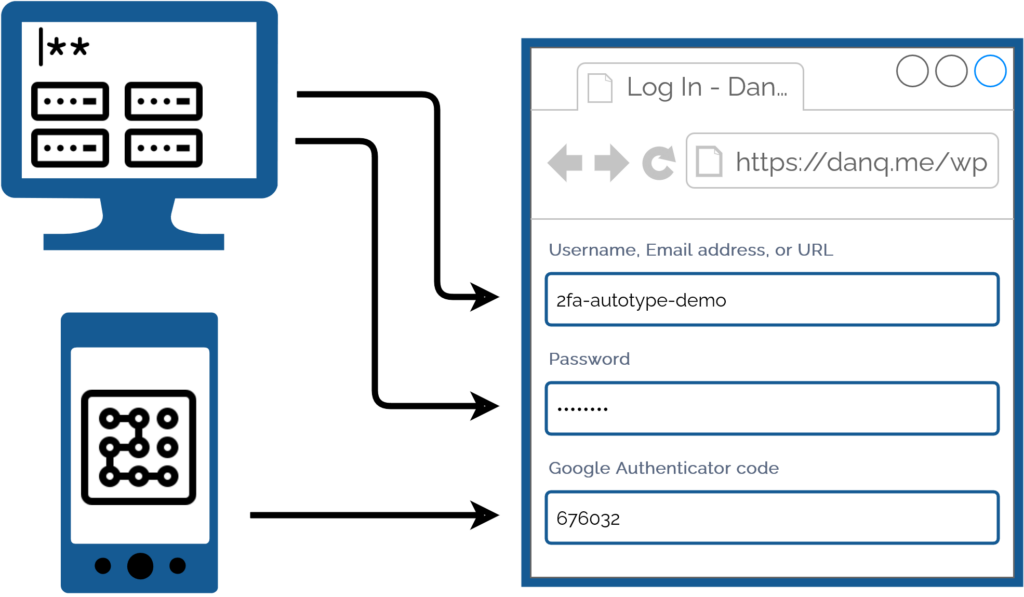
I promised back in 2018 to talk about what this kind of authentication usually1 looks like for me, because my approach is a little different:
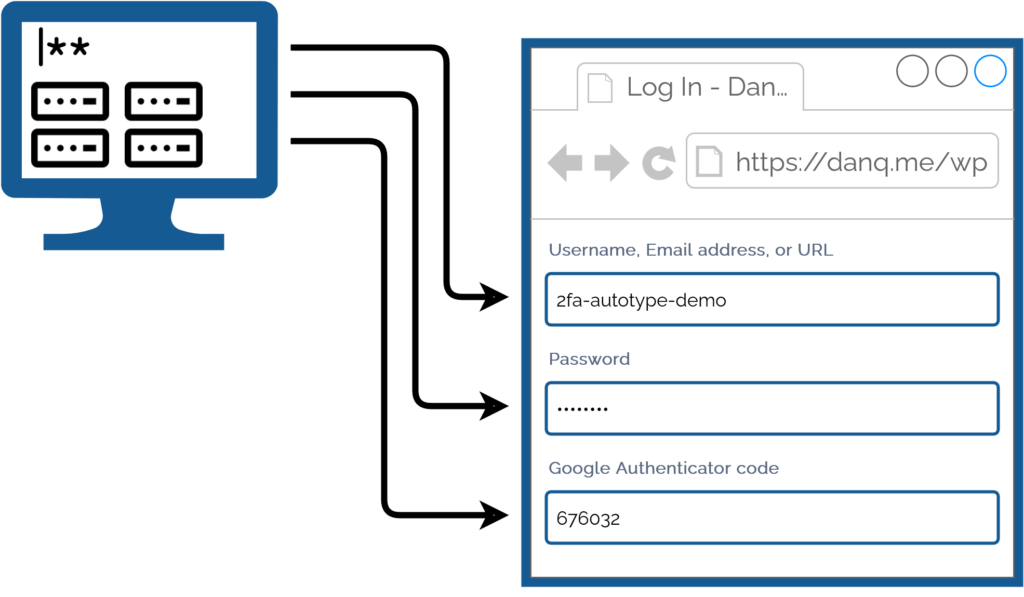
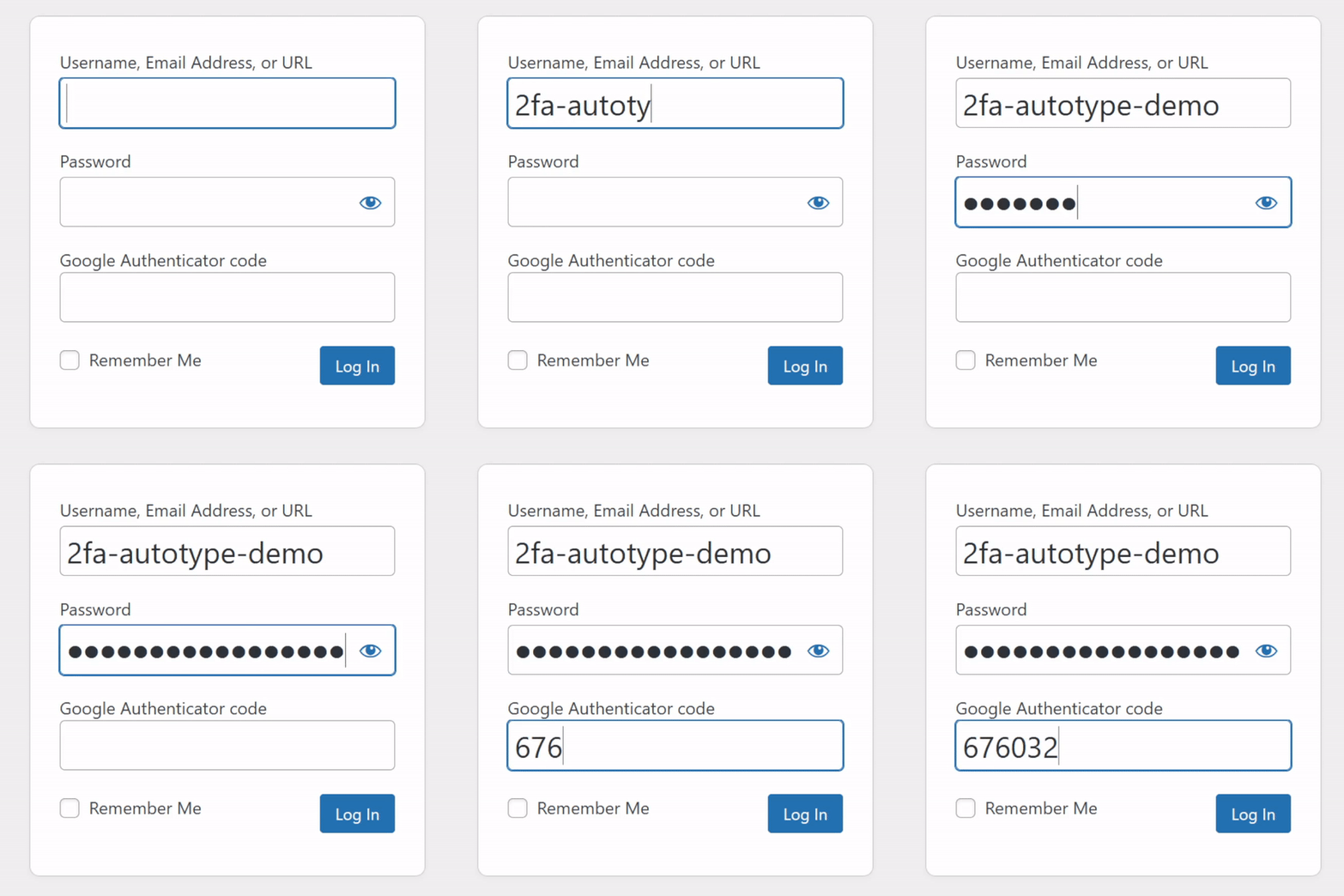
I simply press my magic key combination, (re-)authenticate with my password safe if necessary, and then it does the rest. Including, thanks to some light scripting/hackery, many authentication flows that span multiple pages and even ones that ask for randomly-selected characters from a secret word or similar2.
My approach isn’t without its controversies. The argument against it broadly comes down to this:
Storing the username, password, and the means to provide an authentication code in the same place means that you’re no-longer providing a second factor. It’s no longer e.g. “something you have” and “something you know”, but just “something you have”. Therefore, this is equivalent to using only a username and password and not enabling 2FA at all.
I disagree with this argument. I provide two counter-arguments:
1. For most people, they’re already simplifying down to “something you have” by running the authenticator software on the same device, protected in the same way, as their password safe: it’s their mobile phone! If your phone can be snatched while-unlocked, or if your password safe and authenticator are protected by the same biometrics3, an attacker with access to your mobile phone already has everything.
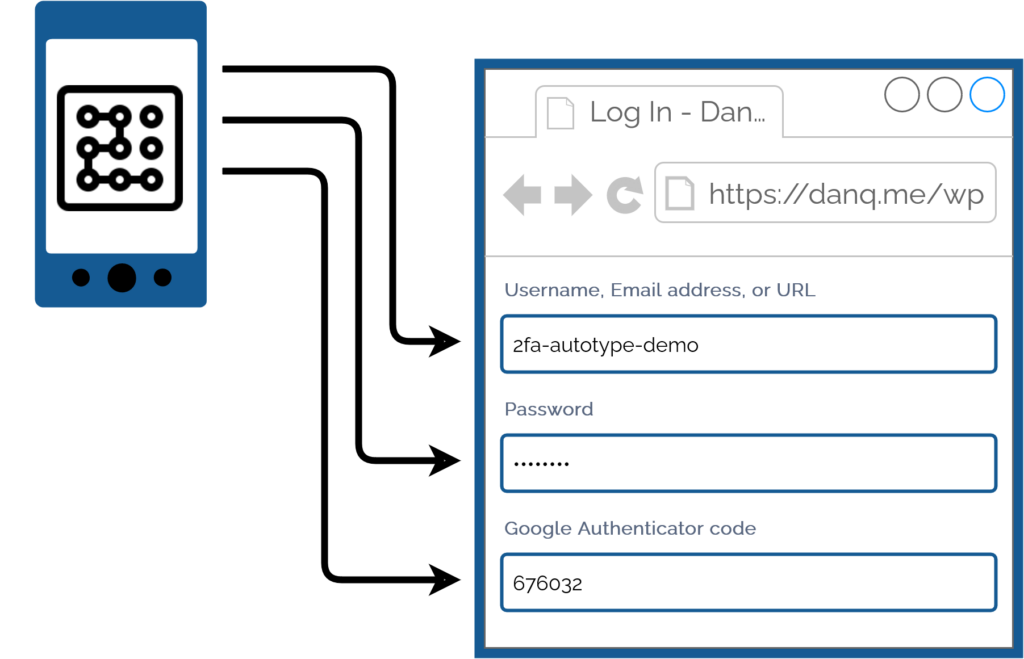
2. Even if we do accept that this is fewer factors, it doesn’t completely undermine the value of time-based second factor codes4. Time-based codes have an important role in protecting you from authentication replay!
For instance: if you use a device for which the Internet connection is insecure, or where there’s a keylogger installed, or where somebody’s shoulder-surfing and can see what you type… the most they can get is your username, password, and a code that will stop working in 30 seconds5. That’s still a huge improvement on basic username/password-based system.6
Note that I wouldn’t use this approach if I were using a cloud-based password safe like those I linked in the first paragraph! For me personally: storing usernames, passwords, and 2FA authentication keys together on somebody else’s hardware feels like too much of a risk.
But my password manager of choice is KeePassXC/KeePassDX, to which I migrated after I realised that the plugins I was using in vanilla KeePass were provided as standard functionality in those forks. I keep the master copy of my password database encrypted on a pendrive that attaches to my wallet, and I use Syncthing to push secondary copies to a couple of other bits of hardware I control, such as my phone. Cloud-based password safes have their place and they’re extremely accessible to people new to password managers or who need organisational “sharing” features, but they’re not the right tool for me.
As always: do your own risk assessment and decide what’s right for you. But from my experience I can say this: seamless, secure logins feel magical, and don’t have to require an unacceptable security trade-off.
1 Not all authentication looks like this, for me, because some kinds of 2FA can’t be provided by my password safe. Some service providers “push” verification checks to an app, for example. Others use proprietary TOTP-based second factor systems (I’m looking at you, banks!). And some, of course, insist on proven-to-be-terrible solutions like email and SMS-based 2FA.
2 Note: asking for a username, password, and something that’s basically another-password is not true multifactor authentication (I’m looking at you again, banks!), but it’s still potentially useful for organisations that need to authenticate you by multiple media (e.g. online and by telephone), because it can be used to help restrict access to secrets by staff members. Important, but not the same thing: you should still demand 2FA.
3 Biometric security uses your body, not your mind, and so is still usable even if you’re asleep, dead, uncooperative, or if an attacker simply removes and retains the body part that is to be scanned. Eww.
4 TOTP is a very popular mechanism: you’ve probably used it. You get a QR code to scan into the authenticator app on your device (or multiple devices, for redundancy), and it comes up with a different 6-digit code every 30 seconds or so.
5 Strictly, a TOTP code is likely to work for a few minutes, on account of servers allowing for drift between your clock and theirs. But it’s still a short window.
6 It doesn’t protect you if an attacker manages to aquire a dump of the usernames, inadequately-hashed passwords, and 2FA configuration from the server itself, of course, where other forms of 2FA (e.g. certificate-based) might, but protecting servers from bad actors is a whole separate essay.
Following their security incident last month, many users of LastPass are in the process of cycling their security credentials for many of their accounts1. I don’t use LastPass2, but I’ve had ocassion to cycle credentials before, so I appreciate the pain that people are going through.
It’s not just passwords, though: it may well be your “security question” answers you need to rotate too. Your passwords quickly become worthless if an attacker can guess the answers to your “security questions” at services that use them. If you’re using a password safe anyway, you should either:
In the latter case, you’re probably storing your security answers in a password safe5. If the password safe they’re stored in is compromised, you need to change the answers to those security questions in order to secure the account.
This leads to the unusual situation where you can need to call up your bank and say: “Hi, I’d like to change my mother’s maiden name.” (Or, I suppose, father’s middle name, first pet’s name, place of birth, or whatever.) Banks in particular are prone to disallowing you from changing your security answers over the Internet, but all kinds of other businesses can also make this process hard… presumably because a well-meaning software engineer couldn’t conceive of any reason that a user might want to.
I sometimes use a pronouncable password generator to produce fake names for security question answers. And I’ll tell you what: I get some bemused reactions when I say things like “I’d like to change my mother’s maiden name from Tuyiborhooniplashon to Mewgofartablejuki.”
But at least it forestalls them asking me “So why did you change your surname to ‘Q’?”
1 If you use LastPass, you should absolutely plan to do this. IMHO, LastPass’s reassurances about the difficulty in cracking the encryption on the leaked data is a gross exaggeration. I’m not saying you need to panic – so long as your master password is reasonably-long and globally-unique – but perhaps cycle all your credentials during 2023. Oh, and don’t rely on your second factor: it doesn’t help with this particular incident.
2 I used to use LastPass, until around 2016, and I still think it’s a good choice for many people, but nowadays I carry an encrypted KeePassXC password safe on a pendrive (with an automated backup onto an encrypted partition on our household NAS). This gives me some security and personalisation benefits, at the expense of only a little convenience.
3 If you’re confident that you could never lose your password (or rather: that you could never lose your password without also losing the security question answers because you would store them in the same place!), there’s no value in security questions, and the best thing you can do might be to render them unusable.
4 If you’re dealing with a service that uses the security questions in a misguided effort to treat them as a second factor, or that uses them for authentication when talking to them on the telephone, you’ll need to have usable answers to the questions for when they come up.
5 You can, of course, use a different password safe for your randomly-generatred security question answers than you would for the password itself; perhaps a more-secure-but-less-convenient one; e.g. an encrypted pendrive kept in your fire safe?
Let’s not sell Mastodon short here. The service you compare it to – Twitter – solves this problem… but only if you trust Twitter as an authority on the identity of people. Mastodon also solves the problem, but it puts the trust in a different place: domain names and account pages.
If you want to “verify” yourself on Mastodon, you can use a rel=”me” link from a page or domain you control. It looks like this:
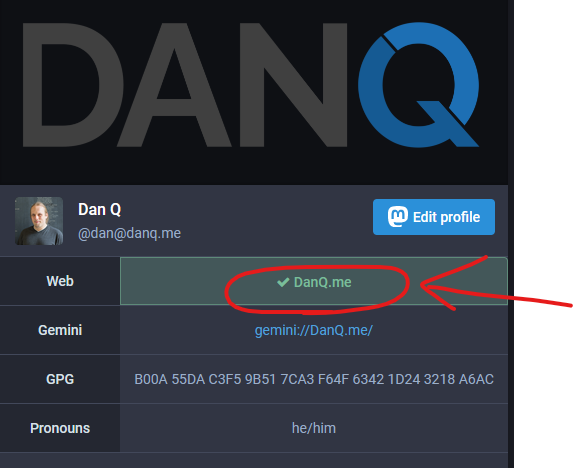
A great thing about this form of verification is you don’t have to trust my server (and you probably shouldn’t): you can check it for yourself to ensure that the listed website really does state that this is the official Mastodon account of “me”.
You can argue this just moves the problem further down the road – instead of trusting a corporation that have shown that they’re not above selling the rights to your identity you have to trust that a website is legitimate – and you’d be right. But in my case for example you can use years of history, archive.org, cross-links etc. to verify that the domain is “me”, and from that you can confirm the legitimacy of my Mastodon account. Anybody who can spoof multiple decades of my history and maintain that lie for a decade of indepdendent web archiving probably deserves to be able to pretend to be me!
There are lots of other distributed methods too: web-of-trust systems, signed keys, even SSL certificates would be a potential solution. Looking again at my profile, you’ll see that I list the fingerprint of my GPG key, which you can compare to ones in public directories (which are co-signed by other people). This way you’d know that if you sent an encrypted DM to my Mastodon inbox it could only be decrypted if I were legitimately me. Or I could post a message signed with that key to prove my identity, insofar as my web-of-trust meets your satisfaction.
If gov.uk’s page about 10 Downing Street had profile pages for cabinet members with rel=”me” links to their social profiles I’d be more-likely to trust the legitimacy of those social profiles than I would if they had a centralised verification such as a Twitter “blue tick”.
Fediverse identify verification isn’t as hard a problem to solve as Derek implies, and indeed it’s already partially-solved. Not having a single point of authority is less convenient, sure, but it also protects you from some of the more-insidious identity problems that systems like Twitter’s have.
This article is a repost promoting content originally published elsewhere. See more things Dan's reposted.
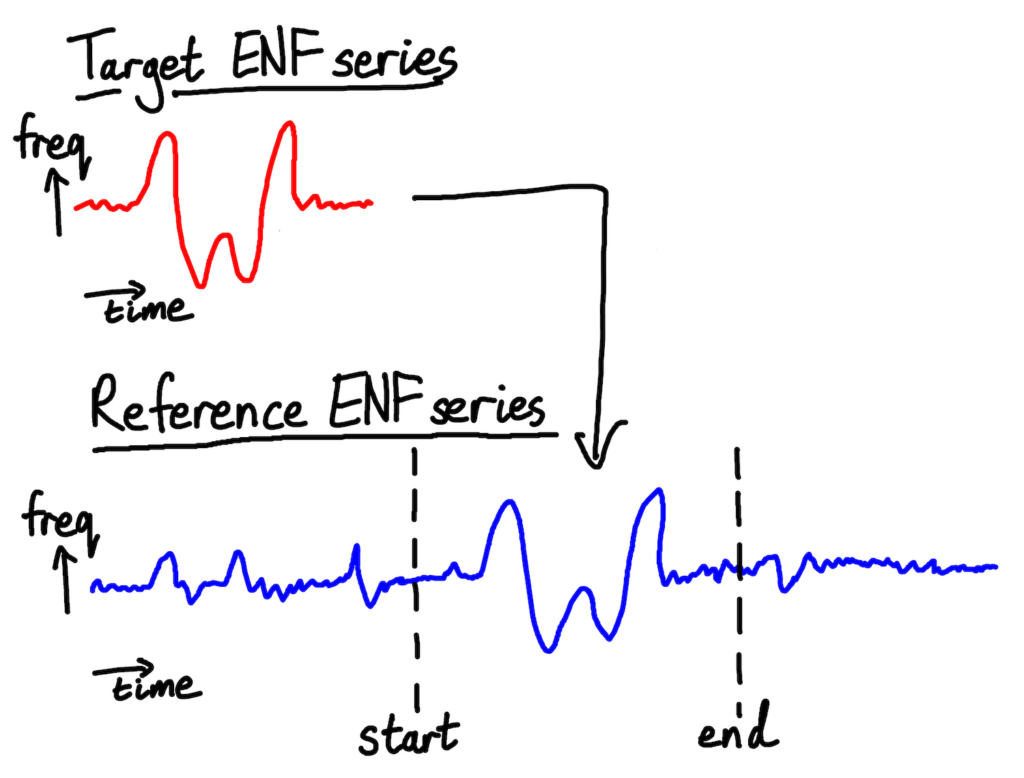
We’re going to use ENF matching to answer the question “here’s a recording, when was it was (probably) taken?” I say “probably” because all that ENF matching can give us is a statistical best guess, not a guarantee. Mains hum isn’t always present on recordings, and even when it is, our target recording’s ENF can still match with the wrong section of the reference database by statistical misfortune.
Still, even though all ENF matching gives us is a guess, it’s usually a good one. The longer the recording, the more reliable the estimate; in the academic papers that I’ve read 10 minutes is typically given as a lower bound for getting a decent match.
To make our guess, we’ll need to:
- Extract the target recording’s ENF values over time
- Find a database of reference ENF values, taken directly from the electrical grid serving the area where the recording was made
- Find the section of the reference ENF series that best matches the target. This section is our best guess for when the target recording was taken
We’ll start at the top.
…
About a year after Tom Scott did a video summarising how deviation over time (and location!) of the background electrical “hum” produced by AC power can act as a forensic marker on audio recordings, Robert Heaton’s produced an excellent deep-dive into how you can play with it for yourself, including some pretty neat code.
I remember first learning about this technique a few years ago during my masters in digital forensics, and my first thought was about how it might be effectively faked. Faking the time of recording of some audio after the fact (as well as removing the markers) is challenging, mostly because you’ve got to ensure you pick up on the harmonics of the frequencies, but it seems to me that faking it at time-of-recording ought to be reasonably easy: at least, so long as you’re already equipped with a mechanism to protect against recording legitimate electrical hum (isolated quiet-room, etc.):
Taking a known historical hum-pattern, it ought to be reasonably easy to produce a DC-to-AC converter (obviously you want to be running off a DC circuit to begin with, e.g. from batteries, so you don’t pick up legitimate hum) that regulates the hum frequency in a way that matches the historical pattern. Sure, you could simply produce the correct “noise”, but doing it this way helps ensure that the noise behaves appropriately under the widest range of conditions. I almost want to build such a device, perhaps out of an existing portable transformer (they come in big battery packs nowadays, providing a two-for-one!) but of course: who has the time? Plus, if you’d ever seen my soldering skills you’d know why I shouldn’t be allowed to work on anything like this.
Hey @VOXI_UK! There’s a security #vulnerability in your website. An attacker can (a) exfiltrate mobile numbers and (b) authenticate bypassing OTP.
Not sure who to talk to about ethical disclosure. Let me know?
Sometimes a web standard disappears quickly at the whim of some company, perhaps to a great deal of complaint (and at least one joke).
But sometimes, they disappear slowly, like this kind of web address:
http://username:password@example.com/somewhere
If you’ve not seen a URL like that before, that’s fine, because the answer to the question “Can I still use HTTP Basic Auth in URLs?” is, I’m afraid: no, you probably can’t.
But by way of a history lesson, let’s go back and look at what these URLs were, why they died out, and how web browsers handle them today. Thanks to Ruth who asked the original question that inspired this post.
The early Web wasn’t built for authentication. A resource on the Web was theoretically accessible to all of humankind: if you didn’t want it in the public eye, you didn’t put it on the Web! A reliable method wouldn’t become available until the concept of state was provided by Netscape’s invention of HTTP cookies in 1994, and even that wouldn’t see widespread for several years, not least because implementing a CGI (or similar) program to perform authentication was a complex and computationally-expensive option for all but the biggest websites.
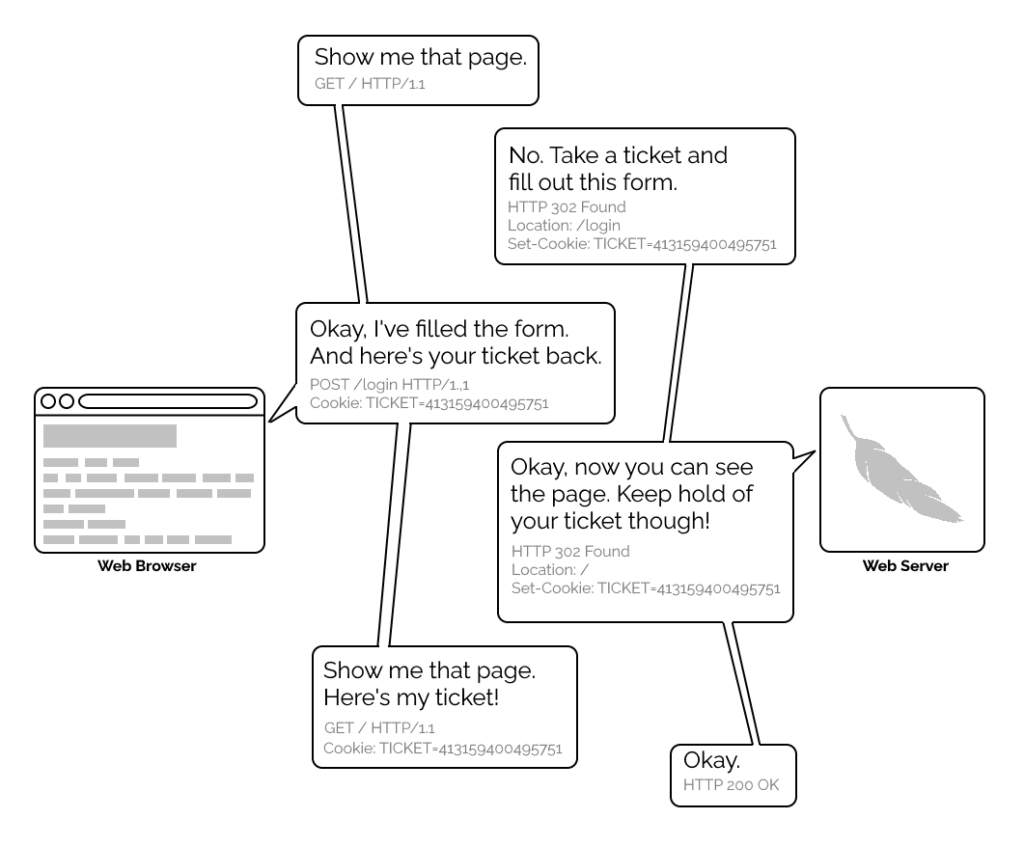
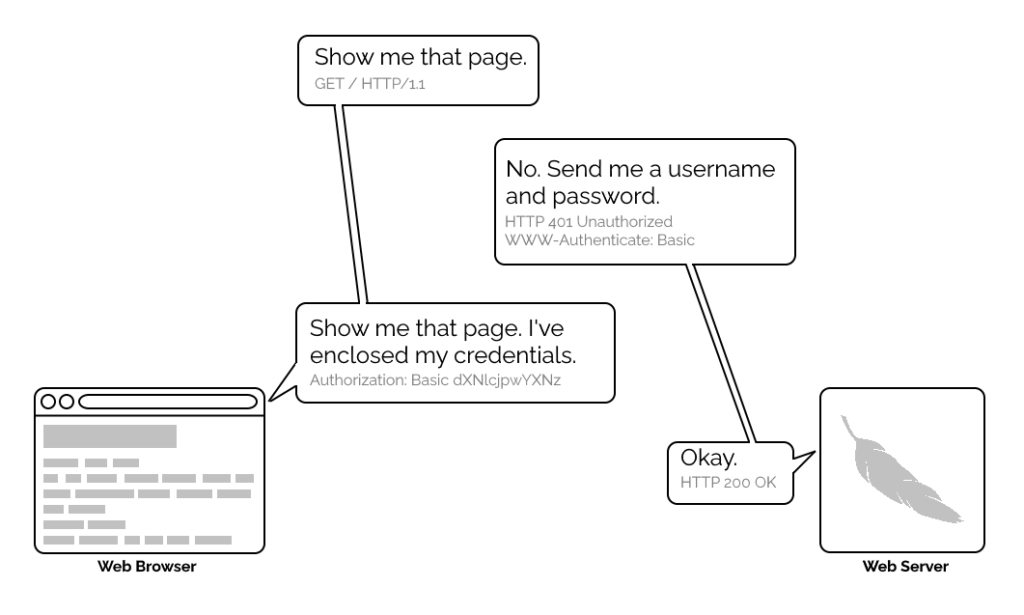
1996’s HTTP/1.0 specification tried to simplify things, though, with the introduction of the WWW-Authenticate header. The idea was that when a browser tried to access something that required
authentication, the server would send a 401 Unauthorized response along with a WWW-Authenticate header explaining how the browser could authenticate
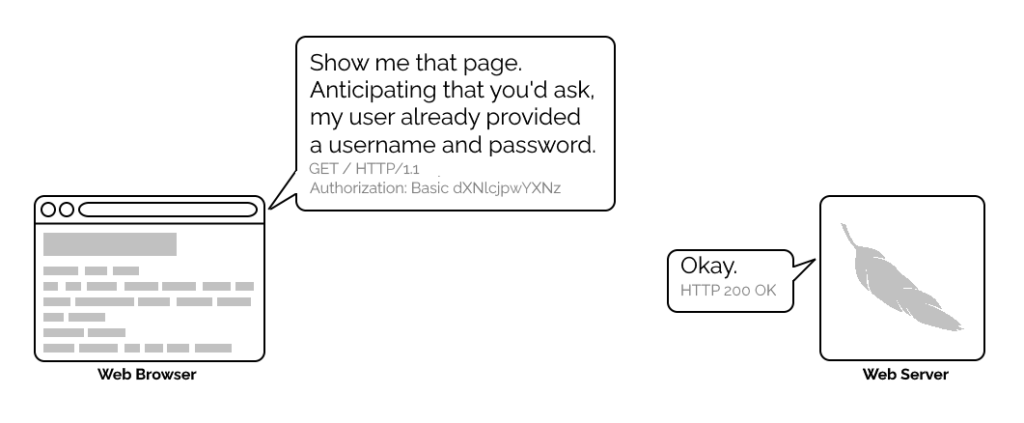
itself. Then, the browser would send a fresh request, this time with an Authorization: header attached providing the required credentials. Initially, only “basic
authentication” was available, which basically involved sending a username and password in-the-clear unless SSL (HTTPS) was in use, but later, digest authentication and a host of others would appear.
Webserver software quickly added support for this new feature and as a result web authors who lacked the technical know-how (or permission from the server administrator) to implement
more-sophisticated authentication systems could quickly implement HTTP Basic Authentication, often simply by adding a .htaccess file to the relevant directory.
.htaccess files would later go on to serve many other purposes, but their original and perhaps best-known purpose – and the one that gives them their name – was access
control.
A separate specification, not specific to the Web (but one of Tim Berners-Lee’s most important contributions to it), described the general structure of URLs as follows:
<scheme>://<username>:<password>@<host>:<port>/<url-path>#<fragment>
At the time that specification was written, the Web didn’t have a mechanism for passing usernames and passwords: this general case was intended only to apply to protocols that did have these credentials. An example is given in the specification, and clarified with “An optional user name. Some schemes (e.g., ftp) allow the specification of a user name.”
But once web browsers had WWW-Authenticate, virtually all of them added support for including the username and password in the web address too. This allowed for
e.g. hyperlinks with credentials embedded in them, which made for very convenient bookmarks, or partial credentials (e.g. just the username) to be included in a link, with the
user being prompted for the password on arrival at the destination. So far, so good.
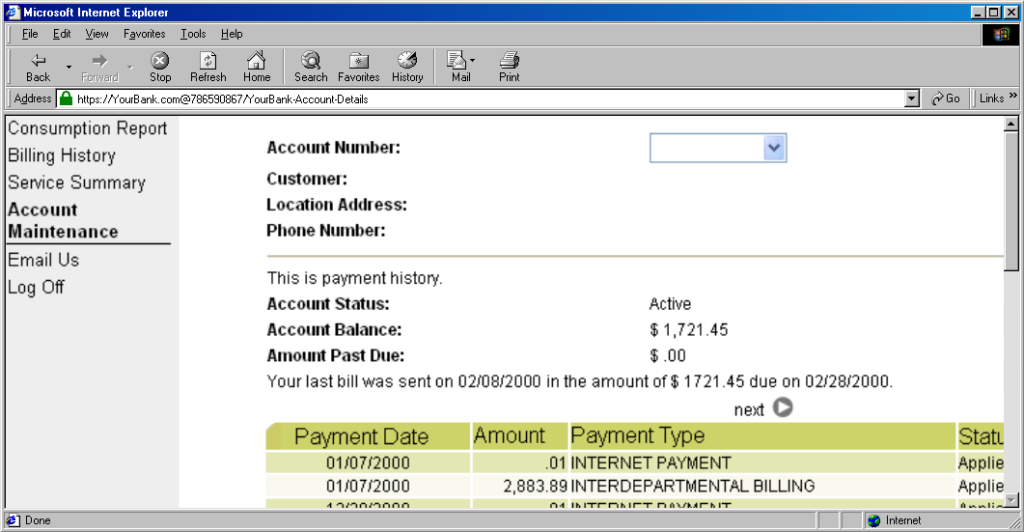
The technique fell out of favour as soon as it started being used for nefarious purposes. It didn’t take long for scammers to realise that they could create links like this:
https://YourBank.com@HackersSite.com/
Everything we were teaching users about checking for “https://” followed by the domain name of their bank… was undermined by this user interface choice. The poor victim would actually be connecting to e.g. HackersSite.com, but a quick glance at their address bar would leave them convinced that they were talking to YourBank.com!
Theoretically: widespread adoption of EV certificates coupled with sensible user interface choices (that were never made) could have solved this problem, but a far simpler solution was just to not show usernames in the address bar. Web developers were by now far more excited about forms and cookies for authentication anyway, so browsers started curtailing the “credentials in addresses” feature.
(There are other reasons this particular implementation of HTTP Basic Authentication was less-than-ideal, but this reason is the big one that explains why things had to change.)
One by one, browsers made the change. But here’s the interesting bit: the browsers didn’t always make the change in the same way.
Let’s examine some popular browsers. To run these tests I threw together a tiny web application that outputs
the Authorization: header passed to it, if present, and can optionally send a 401 Unauthorized response along with a WWW-Authenticate: Basic realm="Test Site" header in order to trigger basic authentication. Why both? So that I can test not only how browsers handle URLs containing credentials when an authentication request is received, but how they handle them when one is not. This is relevant because
some addresses – often API endpoints – have optional HTTP authentication, and it’s sometimes important for a user agent (albeit typically a library or command-line one) to pass credentials without
first being prompted.
In each case, I tried each of the following tests in a fresh browser instance:
http://<username>:<password>@<domain>/optional (authentication is optional).
http://<username>:<password>@<domain>/mandatory (authentication is mandatory).
/mandatory.
/optional.
I’m only testing over the http scheme, because I’ve no reason to believe that any of the browsers under test treat the https scheme differently.
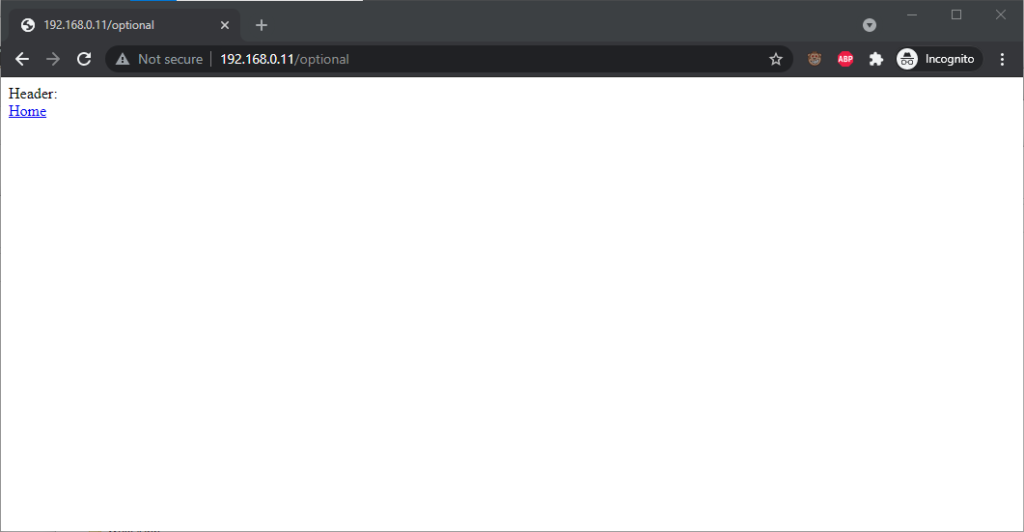 Chrome 93 and Edge 93 both immediately
suppressed the username and password from the address bar, along with the “http://”
as we’ve come to expect of them. Like the “http://”, though, the plaintext username and password are still there. You can retrieve them by copy-pasting the entire address.
Chrome 93 and Edge 93 both immediately
suppressed the username and password from the address bar, along with the “http://”
as we’ve come to expect of them. Like the “http://”, though, the plaintext username and password are still there. You can retrieve them by copy-pasting the entire address.
Opera 78 similarly suppressed the username, password, and scheme, but didn’t retain the username and password in a way that could be copy-pasted out.
Authentication was passed only when landing on a “mandatory” page; never when landing on an “optional” page. Refreshing the page or re-entering the address with its credentials did not change this.
Navigating from the “optional” page to the “mandatory” page using only relative links retained the username and password and submitted it to the server when it became mandatory, even Opera which didn’t initially appear to retain the credentials at all.
Navigating from the “mandatory” to the “optional” page using only relative links, or even entering the “optional” page address with credentials after visiting the “mandatory” page, does not result in authentication being passed to the “optional” page. However, it’s interesting to note that once authentication has occurred on a mandatory page, pressing enter at the end of the address bar on the optional page, with credentials in the address bar (whether visible or hidden from the user) does result in the credentials being passed to the optional page! They continue to be passed on each subsequent load of the “optional” page until the browsing session is ended.
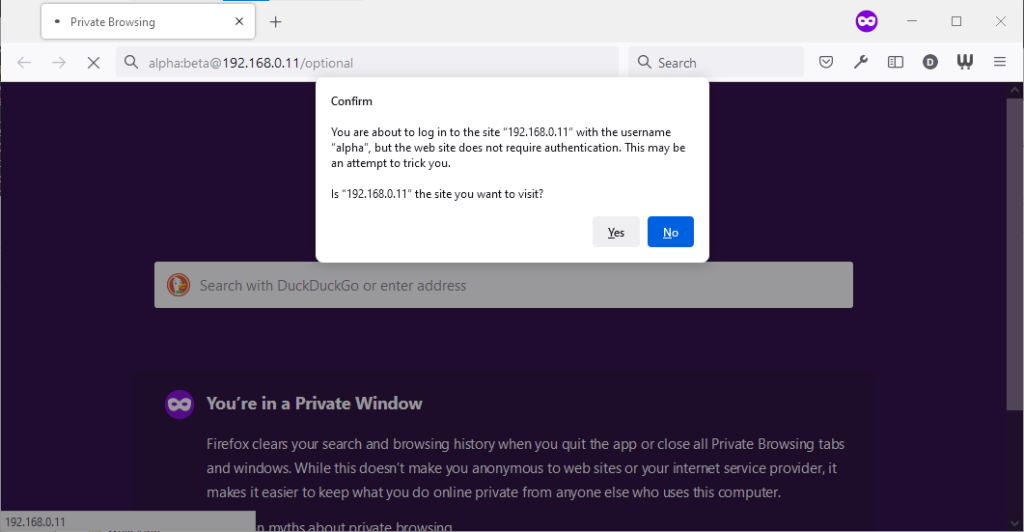 Firefox 91 does a clever thing very much in-line with its image as a browser that puts decision-making authority into the hands of its user. When going to
the “optional” page first it presents a dialog, warning the user that they’re going to a site that does not specifically request a username, but they’re providing one anyway. If the
user says that no, navigation ceases (the GET request for the page takes place the same either way; this happens before the dialog appears). Strangely: regardless of whether the user
selects yes or no, the credentials are not passed on the “optional” page. The credentials (although not the “http://”) appear in the address bar while the user makes their decision.
Firefox 91 does a clever thing very much in-line with its image as a browser that puts decision-making authority into the hands of its user. When going to
the “optional” page first it presents a dialog, warning the user that they’re going to a site that does not specifically request a username, but they’re providing one anyway. If the
user says that no, navigation ceases (the GET request for the page takes place the same either way; this happens before the dialog appears). Strangely: regardless of whether the user
selects yes or no, the credentials are not passed on the “optional” page. The credentials (although not the “http://”) appear in the address bar while the user makes their decision.
Similar to Opera, the credentials do not appear in the address bar thereafter, but they’re clearly still being stored: if the refresh button is pressed the dialog appears again. It does not appear if the user selects the address bar and presses enter.
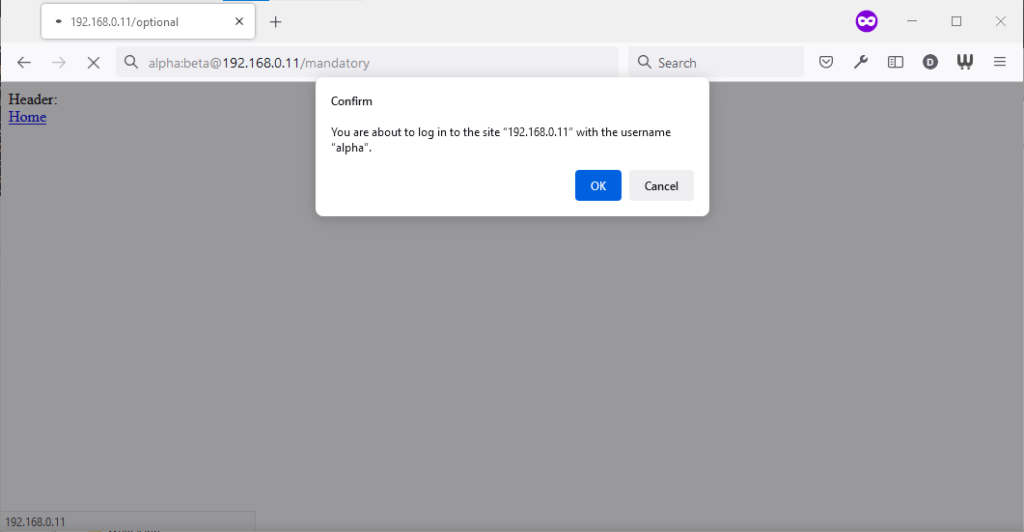 Similarly, going to the “mandatory” page in Firefox results in an informative dialog warning the user that credentials are being passed. I like this approach: not only does it
help protect the user from the use of authentication as a tracking technique (an old technique that I’ve not seen used in well over a decade, mind), it also helps the user be sure that
they’re logging in using the account they mean to, when following a link for that purpose. Again, clicking cancel stops navigation, although the initial request (with no credentials)
and the 401 response has already occurred.
Similarly, going to the “mandatory” page in Firefox results in an informative dialog warning the user that credentials are being passed. I like this approach: not only does it
help protect the user from the use of authentication as a tracking technique (an old technique that I’ve not seen used in well over a decade, mind), it also helps the user be sure that
they’re logging in using the account they mean to, when following a link for that purpose. Again, clicking cancel stops navigation, although the initial request (with no credentials)
and the 401 response has already occurred.
Visiting any page within the scope of the realm of the authentication after visiting the “mandatory” page results in credentials being sent, whether or not they’re included in the address. This is probably the most-true implementation to the expectations of the standard that I’ve found in a modern graphical browser.
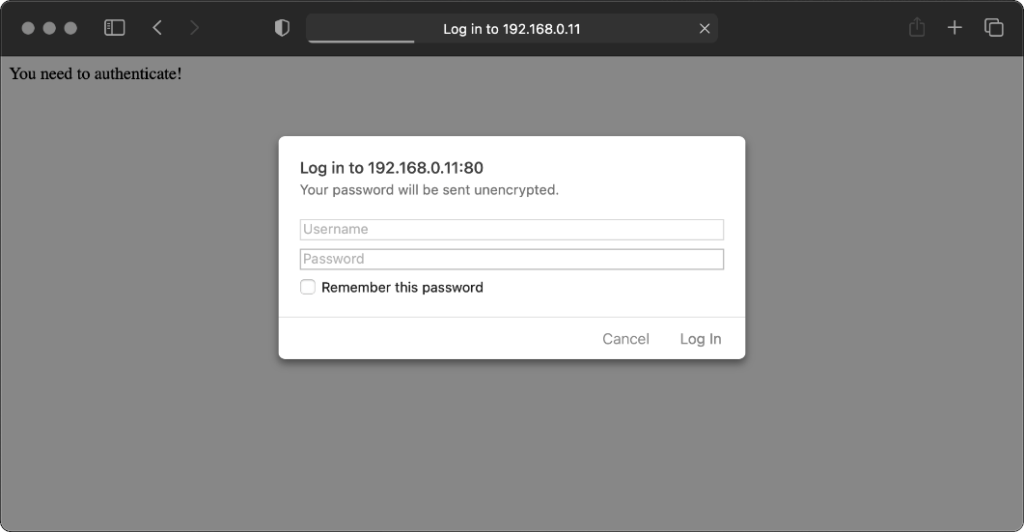 Safari 14 never displays
or uses credentials provided via the web address, whether or not authentication is mandatory. Mandatory authentication is always met by a pop-up dialog, even if credentials were
provided in the address bar. Boo!
Safari 14 never displays
or uses credentials provided via the web address, whether or not authentication is mandatory. Mandatory authentication is always met by a pop-up dialog, even if credentials were
provided in the address bar. Boo!
Once passed, credentials are later provided automatically to other addresses within the same realm (i.e. optional pages).
Let’s try some older browsers.
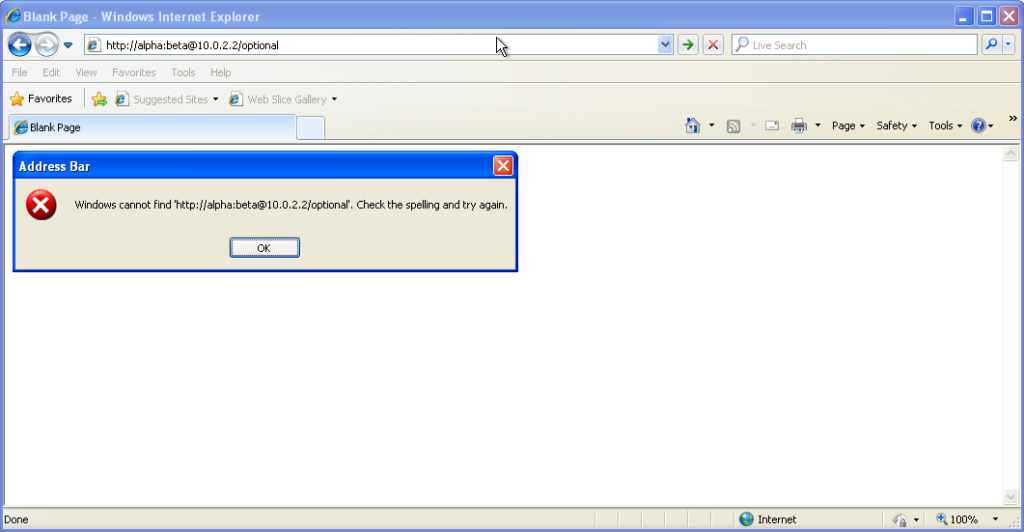 From version 7 onwards – right up to the final version 11 – Internet Explorer fails to even recognise addresses with authentication credentials in as
legitimate web addresses, regardless of whether or not authentication is requested by the server. It’s easy to assume that this is yet another missing feature in the browser we all love
to hate, but it’s interesting to note that credentials-in-addresses is permitted for
From version 7 onwards – right up to the final version 11 – Internet Explorer fails to even recognise addresses with authentication credentials in as
legitimate web addresses, regardless of whether or not authentication is requested by the server. It’s easy to assume that this is yet another missing feature in the browser we all love
to hate, but it’s interesting to note that credentials-in-addresses is permitted for ftp:// URLs…
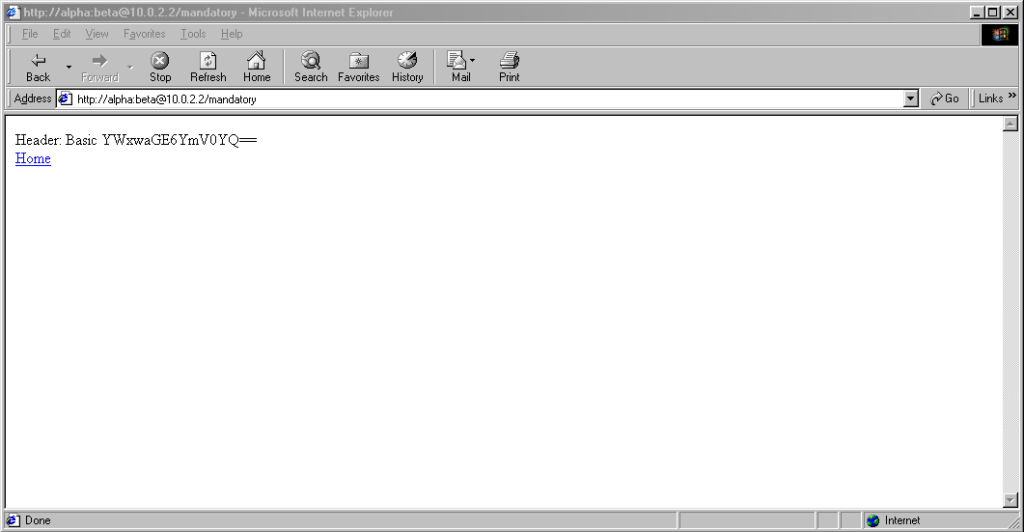 …and if you go back a little
way, Internet Explorer 6 and below supported credentials in the address bar pretty much as you’d expect based on the standard. The error message seen in IE7 and above is a deliberate design
decision, albeit a somewhat knee-jerk reaction to the security issues posed by the feature (compare to the more-careful approach of other browsers).
…and if you go back a little
way, Internet Explorer 6 and below supported credentials in the address bar pretty much as you’d expect based on the standard. The error message seen in IE7 and above is a deliberate design
decision, albeit a somewhat knee-jerk reaction to the security issues posed by the feature (compare to the more-careful approach of other browsers).
These older versions of IE even (correctly) retain the credentials through relative hyperlinks, allowing them to be passed when they become mandatory. They’re not passed on optional pages unless a mandatory page within the same realm has already been encountered.
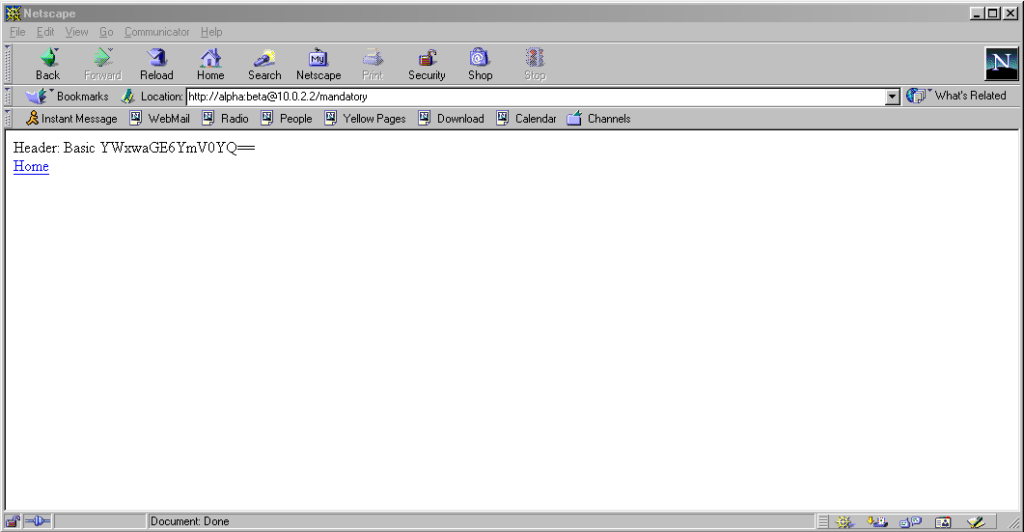 Pre-Mozilla Netscape behaved the same
way. Truly this was the de facto standard for a long period on the Web, and the varied approaches we see today are the anomaly. That’s a strange observation to make,
considering how much the Web of the 1990s was dominated by incompatible implementations of different Web features (I’ve written about the
Pre-Mozilla Netscape behaved the same
way. Truly this was the de facto standard for a long period on the Web, and the varied approaches we see today are the anomaly. That’s a strange observation to make,
considering how much the Web of the 1990s was dominated by incompatible implementations of different Web features (I’ve written about the
<blink> and <marquee> tags before, which was perhaps the most-visible division between the Microsoft and Netscape camps, but there were many,
many more).
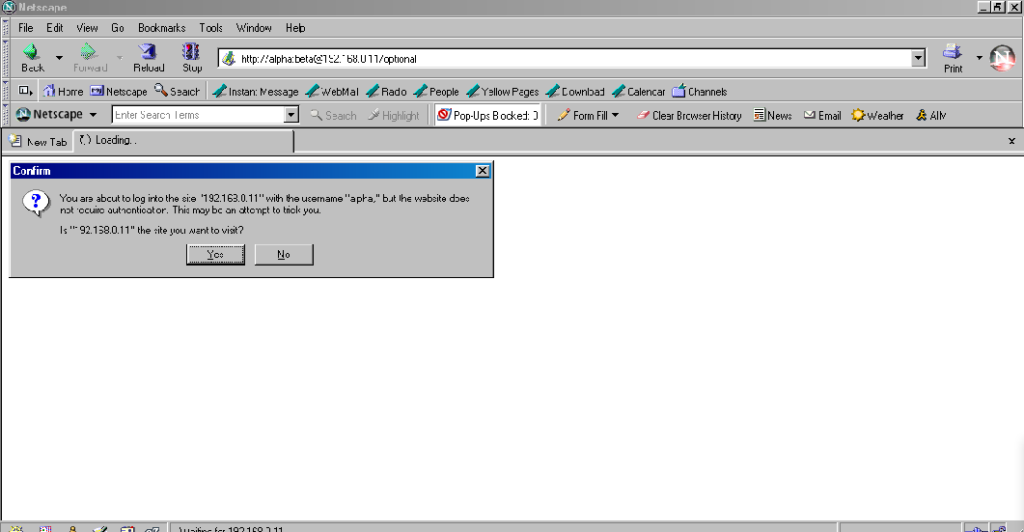 Interestingly: by Netscape 7.2 the browser’s behaviour had evolved to be the same as modern Firefox’s, except that it still displayed the credentials in the
address bar for all to see.
Interestingly: by Netscape 7.2 the browser’s behaviour had evolved to be the same as modern Firefox’s, except that it still displayed the credentials in the
address bar for all to see.
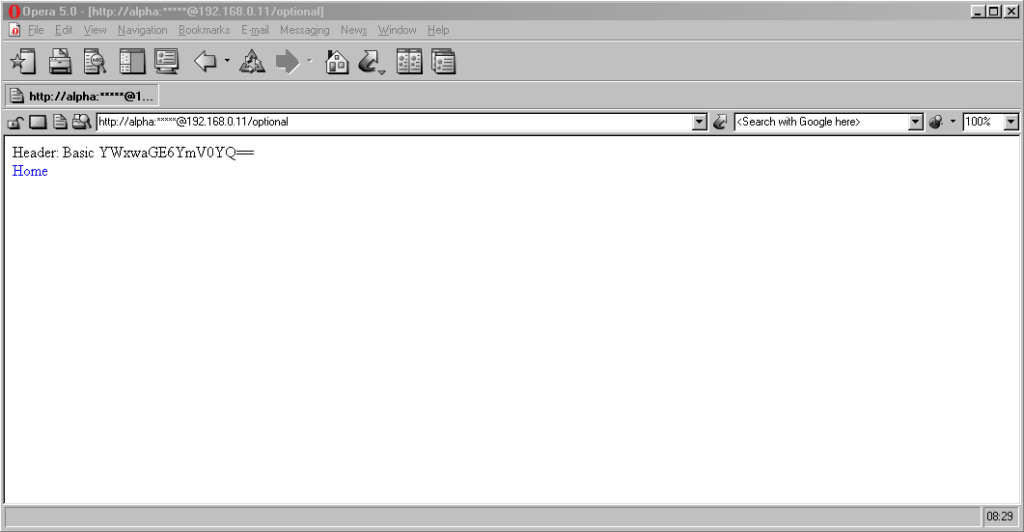 Now here’s a real gem: pre-Chromium Opera. It would send credentials to “mandatory” pages and remember them for the duration of the browsing session, which is great.
But it would also send credentials when passed in a web address to “optional” pages. However, it wouldn’t remember them on optional pages unless they remained in the
address bar: this feels to me like an optimum balance of features for power users. Plus, it’s one of very few browsers that permitted you to change credentials
mid-session: just by changing them in the address bar! Most other browsers, even to this day, ignore changes to HTTP
Authentication credentials, which was sometimes be a source of frustration back in the day.
Now here’s a real gem: pre-Chromium Opera. It would send credentials to “mandatory” pages and remember them for the duration of the browsing session, which is great.
But it would also send credentials when passed in a web address to “optional” pages. However, it wouldn’t remember them on optional pages unless they remained in the
address bar: this feels to me like an optimum balance of features for power users. Plus, it’s one of very few browsers that permitted you to change credentials
mid-session: just by changing them in the address bar! Most other browsers, even to this day, ignore changes to HTTP
Authentication credentials, which was sometimes be a source of frustration back in the day.
Finally, classic Opera was the only browser I’ve seen to mask the password in the address bar, turning it into a series of asterisks. This ensures the user knows that a password was used, but does not leak any sensitive information to shoulder-surfers (the length of the “masked” password was always the same length, too, so it didn’t even leak the length of the password). Altogether a spectacular design and a great example of why classic Opera was way ahead of its time.
Most people using web addresses with credentials embedded within them nowadays are probably working with code, APIs, or the command line, so it’s unsurprising to see that this is where the most “traditional” standards-compliance is found.
I was unsurprised to discover that giving curl a username and password in the URL meant that username and password was sent to the server (using Basic authentication, of course, if no authentication was requested):
$ curl http://alpha:beta@localhost/optional


	Header: Basic YWxwaGE6YmV0YQ==


	$ curl http://alpha:beta@localhost/mandatory


	Header: Basic YWxwaGE6YmV0YQ==
However, wget did catch me out. Hitting the same addresses with wget didn’t result in the credentials being sent
except where it was mandatory (i.e. where a HTTP 401 response and a WWW-Authenticate: header was received on the initial attempt). To force wget to
send credentials when they haven’t been asked-for requires the use of the --http-user and --http-password switches:
$ wget http://alpha:beta@localhost/optional -qO-


	Header:


	$ wget http://alpha:beta@localhost/mandatory -qO-


	Header: Basic YWxwaGE6YmV0YQ==
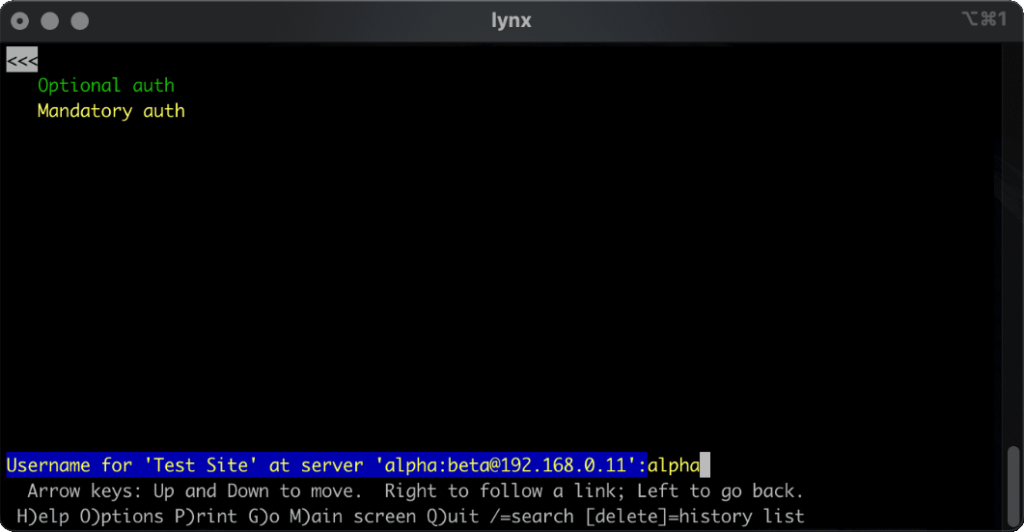
lynx does a cute and clever thing. Like most modern browsers, it does not submit credentials unless specifically requested, but if they’re in the address bar when they become mandatory (e.g. because of following relative hyperlinks or hyperlinks containing credentials) it prompts for the username and password, but pre-fills the form with the details from the URL. Nice.
HTTP Basic Authentication and its close cousin Digest Authentication (which overcomes some of the security limitations of running Basic Authentication over an
unencrypted connection) is very much alive, but its use in hyperlinks can’t be relied upon: some browsers (e.g. IE, Safari)
completely munge such links while others don’t behave as you might expect. Other mechanisms like Bearer see widespread use in APIs, but nowhere else.
The WWW-Authenticate: and Authorization: headers are, in some ways, an example of the best possible way to implement authentication on the Web: as an
underlying standard independent of support for forms (and, increasingly, Javascript), cookies, and complex multi-part conversations. It’s easy to imagine an alternative
timeline where these standards continued to be collaboratively developed and maintained and their shortfalls – e.g. not being able to easily log out when using most graphical browsers!
– were overcome. A timeline in which one might write a login form like this, knowing that your e.g. “authenticate” attributes would instruct the browser to send credentials using an
Authorization: header:
<form method="get" action="/" authenticate="Basic">


	<label for="username">Username:</label> <input type="text" id="username" authenticate="username">


	<label for="password">Password:</label> <input type="text" id="password" authenticate="password">


	<input type="submit" value="Log In">


	</form>
In such a world, more-complex authentication strategies (e.g. multi-factor authentication) could involve encoding forms as JSON. And single-sign-on systems would simply involve the browser collecting a token from the authentication provider and passing it on to the
third-party service, directly through browser headers, with no need for backwards-and-forwards redirects with stacks of information in GET parameters as is the case today.
Client-side certificates – long a powerful but neglected authentication mechanism in their own right – could act as first class citizens directly alongside such a system, providing
transparent second-factor authentication wherever it was required. You wouldn’t have to accept a tracking cookie from a site in order to log in (or stay logged in), and if your
browser-integrated password safe supported it you could log on and off from any site simply by toggling that account’s “switch”, without even visiting the site: all you’d be changing is
whether or not your credentials would be sent when the time came.
The Web has long been on a constant push for the next new shiny thing, and that’s sometimes meant that established standards have been neglected prematurely or have failed to evolve for
longer than we’d have liked. Consider how long it took us to get the <video> and <audio> elements because the “new shiny” Flash came to dominate,
how the Web Payments API is only just beginning to mature despite over 25 years of ecommerce on the Web, or how we still can’t
use Link: headers for all the things we can use <link> elements for despite them being semantically-equivalent!
The new model for Web features seems to be that new features first come from a popular JavaScript implementation, and then eventually it evolves into a native browser feature: for example HTML form validations, which for the longest time could only be done client-side using scripting languages. I’d love to see somebody re-think HTTP Authentication in this way, but sadly we’ll never get a 100% solution in JavaScript alone: (distributed SSO is almost certainly off the table, for example, owing to cross-domain limitations).
Or maybe it’s just a problem that’s waiting for somebody cleverer than I to come and solve it. Want to give it a go?
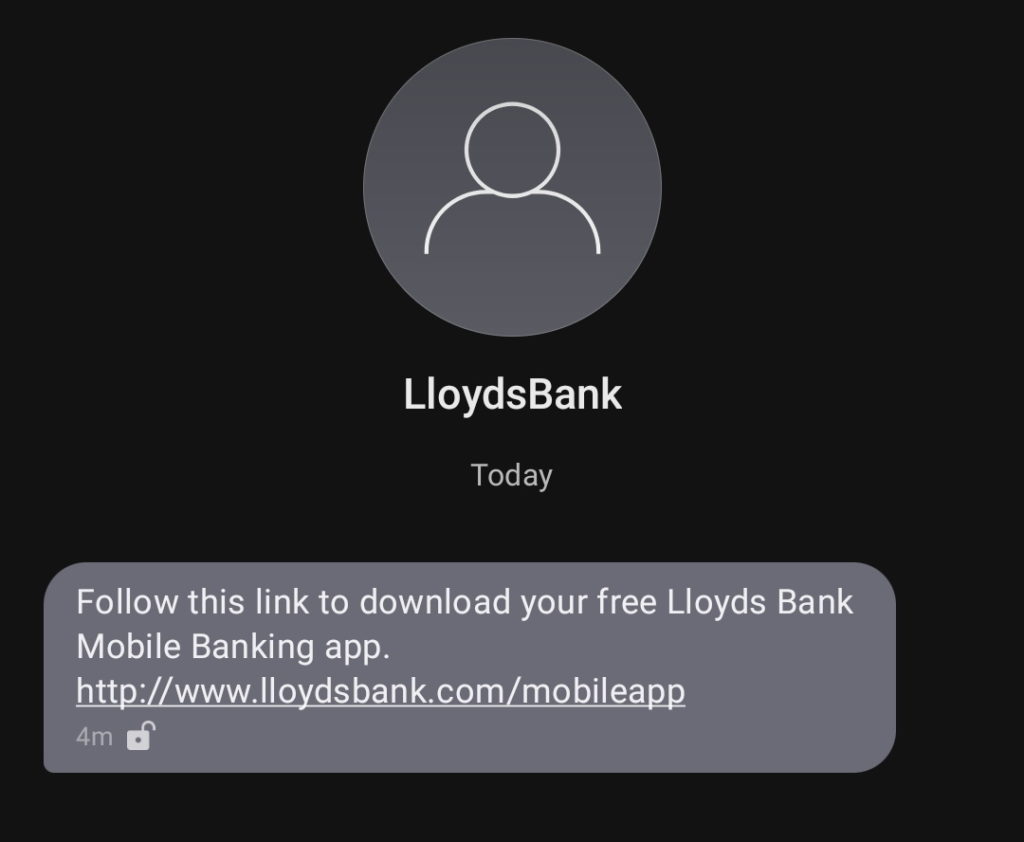
Hey @LloydsBank! 2009 called and asked if you’re done sending your customers links to unencrypted HTTP endpoints yet. How do you feel about switching this to a HTTPS link rather than relying on an interceptable/injectable HTTP request?
This article is a repost promoting content originally published elsewhere. See more things Dan's reposted.
Cellebrite makes software to automate physically extracting and indexing data from mobile devices. They exist within the grey – where enterprise branding joins together with the larcenous to be called “digital intelligence.” Their customer list has included authoritarian regimes in Belarus, Russia, Venezuela, and China; death squads in Bangladesh; military juntas in Myanmar; and those seeking to abuse and oppress in Turkey, UAE, and elsewhere. A few months ago, they announced that they added Signal support to their software.
Their products have often been linked to the persecution of imprisoned journalists and activists around the world, but less has been written about what their software actually does or how it works. Let’s take a closer look. In particular, their software is often associated with bypassing security, so let’s take some time to examine the security of their own software.
…
Recently Moxie, co-author of the Signal Protocol, came into possession of a Cellebrite Extraction Device (phone cracking kit used by law enforcement as well as by oppressive regimes who need to clamp down on dissidents) which “fell off a truck” near him. What an amazing coincidence! He went on to report, this week, that he’d partially reverse-engineered the system, discovering copyrighted code from Apple – that’ll go down well! – and, more-interestingly, unpatched vulnerabilities. In a demonstration video, he goes on to show that a carefully crafted file placed on a phone could, if attacked using a Cellebrite device, exploit these vulnerabilities to take over the forensics equipment.
Obviously this is a Bad Thing if you’re depending on that forensics kit! Not only are you now unable to demonstrate that the evidence you’re collecting is complete and accurate, because it potentially isn’t, but you’ve also got to treat your equipment as untrustworthy. This basically makes any evidence you’ve collected inadmissible in many courts.
Moxie goes on to announce a completely unrelated upcoming feature for Signal: a minority of functionally-random installations will create carefully-crafted files on their devices’ filesystem. You know, just to sit there and look pretty. No other reason:
In completely unrelated news, upcoming versions of Signal will be periodically fetching files to place in app storage. These files are never used for anything inside Signal and never interact with Signal software or data, but they look nice, and aesthetics are important in software. Files will only be returned for accounts that have been active installs for some time already, and only probabilistically in low percentages based on phone number sharding. We have a few different versions of files that we think are aesthetically pleasing, and will iterate through those slowly over time. There is no other significance to these files.
That’s just beautiful.
This article is a repost promoting content originally published elsewhere. See more things Dan's reposted.
# Reserved Strings


		#


		# Strings which may be used elsewhere in code


		undefined


		undef


		null


		NULL
…
then


		constructor


		\


		\\
# Numeric Strings


		#


		# Strings which can be interpreted as numeric


		0


		1


		1.00


		$1.00


		1/2


		1E2
…
Max has produced a list of “naughty strings”: things you might try injecting into your systems along with any fuzz testing you’re doing to check for common errors in escaping, processing, casting, interpreting, parsing, etc. The copy above is heavily truncated: the list is long!
It’s got a lot of the things in it that you’d expect to find: reserved keywords and filenames, unusual or invalid unicode codepoints, tests for the Scunthorpe Problem, and so on. But perhaps my favourite entry is this one, a test for “human injection”:
# Human injection


		#


		# Strings which may cause human to reinterpret worldview


		If you're reading this, you've been in a coma for almost 20 years now. We're trying a new technique. We don't know where this message will end up in your dream, but we hope it works.
		Please wake up, we miss you.
Beautiful.
This article is a repost promoting content originally published elsewhere. See more things Dan's reposted.
…
VPNs have long been essential online tools that provide security, freedom, and most importantly, privacy. Each day, hundreds of millions of internet users connect to a VPN to prevent their online activities from being tracked and monitored so that they can privately access web resources. In other words, the very purpose of a VPN is to prevent the type of surveillance that Google engages in on a massive and unprecedented scale.
Google knows this, and in their whitepaper discussing VPN by Google One, Google acknowledges that VPN usage is becoming mainstream and that “up to 25% of all internet users accessed a VPN within the last month of 2019.” Increasing VPN usage unfortunately poses a significant problem for Google, by making it more difficult to track users across the internet, mine their data, and target them with advertisements. In short, VPNs undermine Google’s power.
…
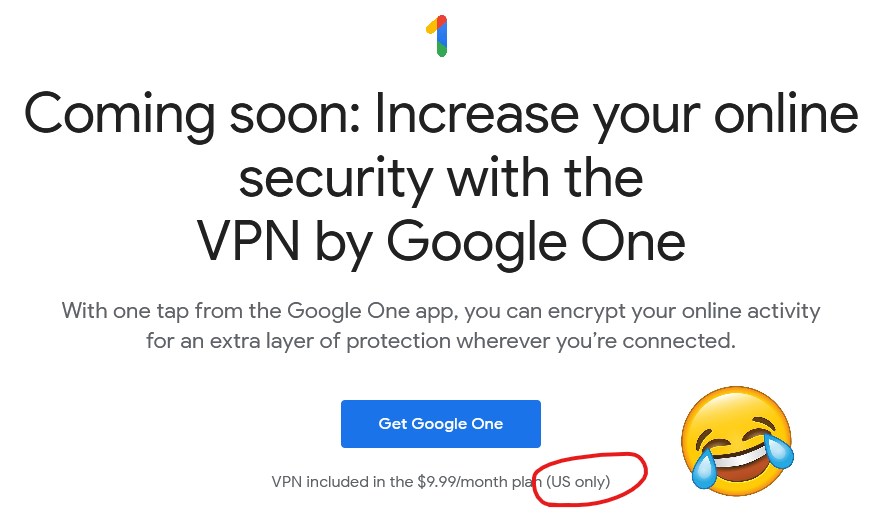
So yeah, it turns out that Google are launching a VPN service. I just checked, and it’s not available to me anyway because it’s US-only (apparently nobody explained to Google the irony of having a VPN service that’s geofenced), but that’s pretty academic because I wasn’t going to touch it with a barge pole in the first place.
Google already collect data on your browsing habits if you use their products. And I’m not just talking about Chrome, which of course continues to track you using your Google Account even after you log out and clear your cookies, and Google’s ubiquitous Web tools, but also the tracking pixels hidden on every other website thanks to Google Analytics, AdWords, reCAPTCHA, Google Fonts, and the like. Sure, you can use e.g. uMatrix to stop all of these (although I’m in need of a replacement), but that’s not a solution for, y’know, normal people. Container tabs help and you should absolutely use them, but they don’t quite go far enough. It’s a challenge.
Switch to their VPN, though, and they’re suddenly able to track all of your browsing activity, in any browser on your device. And probably many of the desktop applications you run, too, as most of them “phone home” for updates or functionality. And because it’s a paid-for VPN service, this data can be instantly linked to your real-world identity. By a company that’s demonstrated its willingness to misuse that data for their own benefit (or for the benefit of overreaching law enforcement agencies). Yeah: no deal, Google.
Perhaps the only company I’d trust less to provide a VPN service would be Facebook, because you just know they’d be doing so exclusively to undermine individual privacy. Oh wait; that’s exactly what they did. Sigh.
In a hurry? Get the Thunderbird plugin here.
I scratched an itch of mine this week and wanted to share the results with you, in case you happen to be one of the few dozen other people on Earth who will cry “finally!” to discover that this is now a thing.
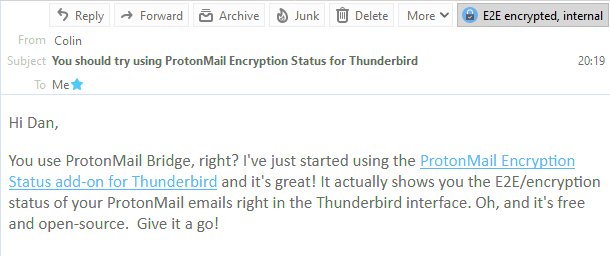
I’ve used ProtonMail as my primary personal email provider for about four years, and I love it. Seamless PGP/GPG for proper end-to-end encryption, privacy as standard, etc. At first, I used their web and mobile app interfaces but over time I’ve come to rediscover my love affair with “proper” email clients, and I’ve been mostly using Thunderbird for my desktop mail. It’s been great: lightning-fast search, offline capabilities, and thanks to IMAP (provided by ProtonMail Bridge) my mail’s still just as accessible when I fall-back on the web or mobile clients because I’m out and about.
But the one thing this set-up lacked was the ability to easily see which emails had been delivered encrypted versus those which had merely been delivered “in the clear” (like most emails) and then encrypted for storage on ProtonMail’s servers. So I fixed it.
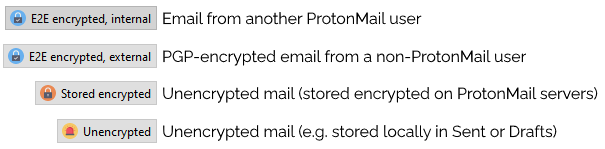
I’ve just released my first ever Thunderbird plugin. If you’re using ProtonMail Bridge, it adds a notification to the corner of every email to say whether it was encrypted in transit or not. That’s all.
And of course it’s open source with a permissive license (and a doddle to compile using your standard operating system tools, if you want to build it yourself). If you’re using Thunderbird and ProtonMail Bridge you should give it a whirl. And if you’re not then… maybe you should consider it?